
Please note:
To unlock this capability, you will need to have added SMS to your Optimove package. If you can’t see this feature in your Optimove instance, contact your CSM to find out more.
A conditional clause is an if/then or if/then/else condition that personalizes or hides content within a template, per individual recipient.
You can use conditional clauses to customize the content of SMS templates based on any customer attribute/activity.
You can use conditional clauses to customize the content of SMS templates based on any customer attribute/activity.
IF Clauses
Only recipients who match the clause will see the section of the template. For all other recipients, the section of the template will be hidden.
IF: YOUR_TAG
Content to display
END:IF
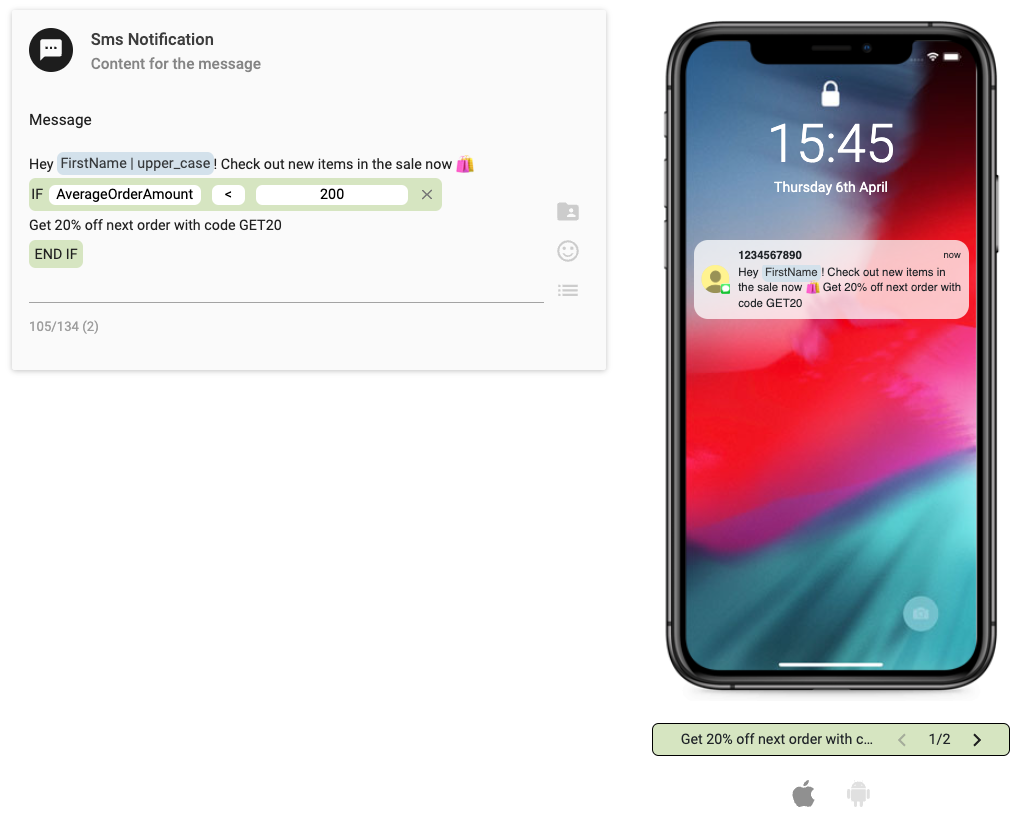
In this example, only customers whose Average Order Amount is lower than $200 will receive the content "Get 20% off next order with code GET20", as an incentive to get them to spend more. All other customers will just see "Hey [FirstName]! Check out new items in the sale now 🛍"
IF/ELSE Clauses
Recipients who match the clause will see the defined section of the template. All other recipients will see the section set under the “Else” condition.
IF: YOUR_TAG
Content to display
ELSE
Alternative content
END: IF
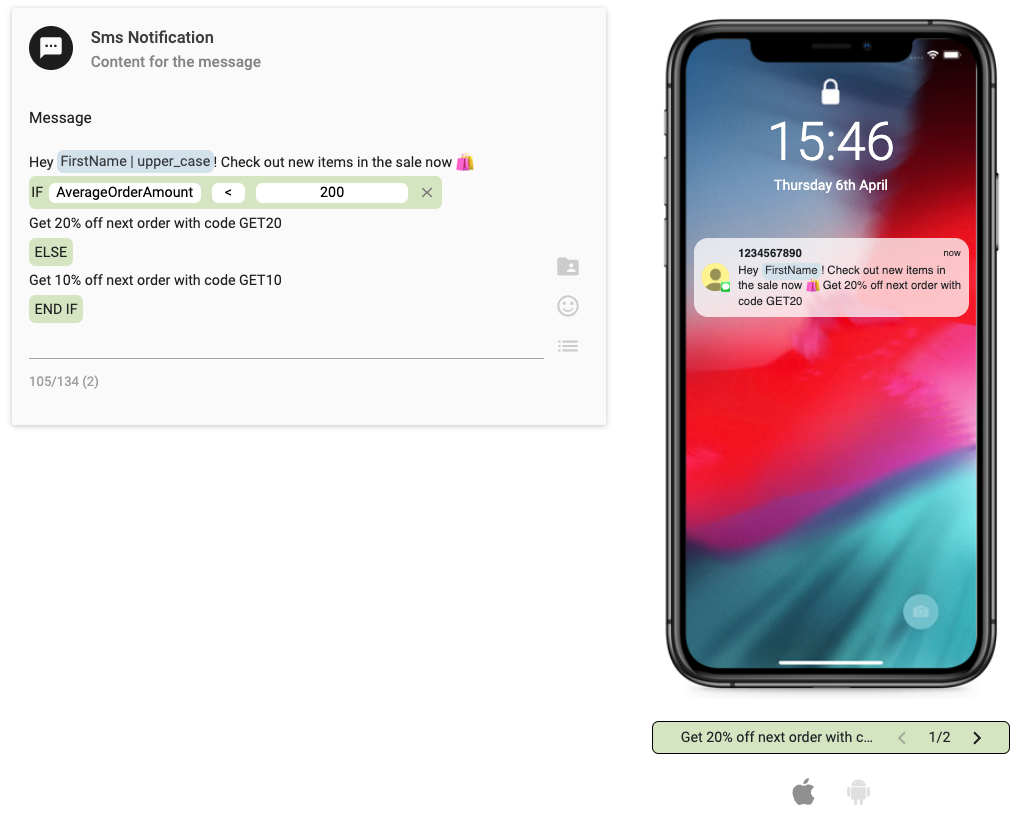
In this example, customers whose Average Order Amount is lower than $200 will receive the content "Get 20% off next order with code GET20", as an incentive to get them to spend more. We still want to give other customers an incentive, but if they usually spend a higher amount anyway we want to give a lower offer. So they will see will just see "Get 10% off next order with code GET10".
IF/ELSEIF Clauses
Recipients will receive the content they match based on the determined clauses. Recipients that don’t match any of the IF clauses, will see the content set under the “Else” condition.
IF: YOUR_TAG
Content to display
ELSEIF: YOUR_TAG
Alternative content
ELSE
Alternative content
END: IF
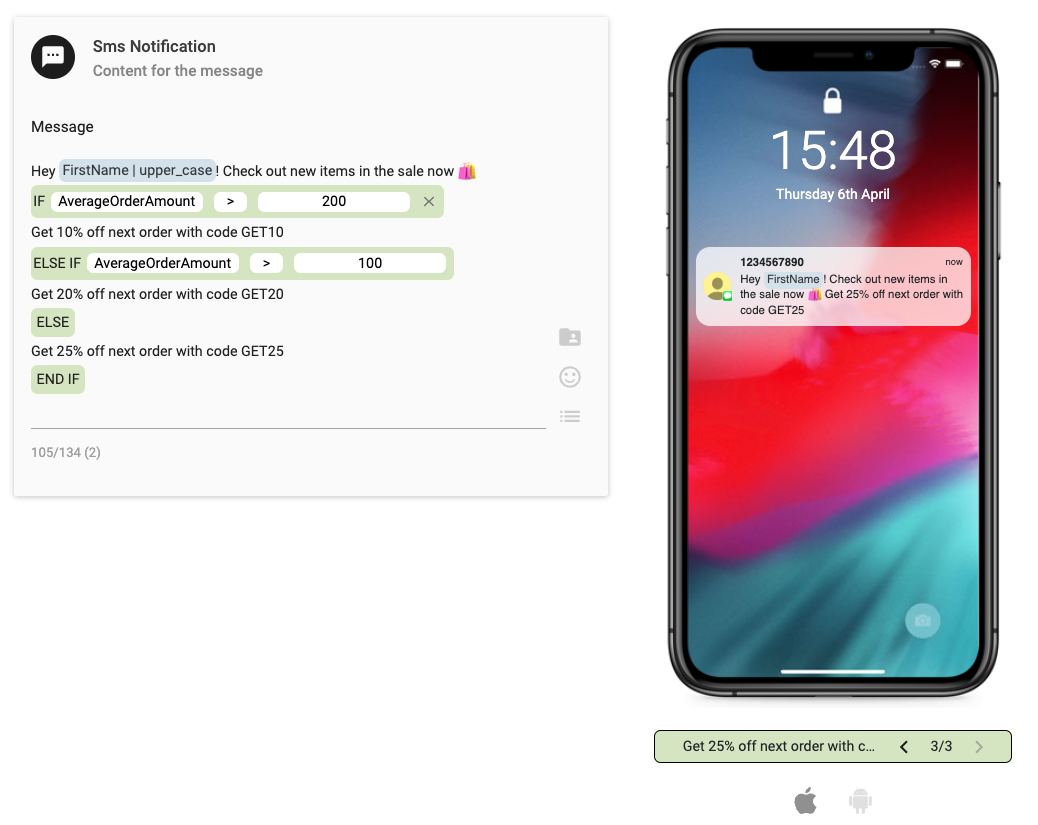
In this example, we want to give three different incentives - high, medium, and low - depending on the Average Order Amount. For those who spend over $200, they will receive the lowest incentive as they already have the desired behavior. For those who spend over $100 (but not higher than $200), they will receive the medium incentive, to encourage a slightly higher spend. For those who don't meet either of the above criteria, so have an Average Order Amount less than $100, they will receive the highest incentive to convince them to purchase and spend more.
Supported Condition Types and Operators
Condition | Usage | Definition |
|---|---|---|
IF | IF: YOUR_TAG content to display END: IF | If the clause is evaluated as True, display the content. Otherwise, hide it. For example: IF: FAVORITE_PRODUCT Special offer for FAVORITE_PRODUCT END: IF |
ELSE | IF: YOUR_TAG content to display ELSE alternative content END: IF | Use ELSE to display alternative content if the first IF clause is evaluated as False. For example: IF: AVERAGEORDERAMOUNT>=200 Content for those customers ELSE Content in other customers END: IF |
ELSEIF | IF: YOUR_TAG Content to display ELSEIF: YOUR_TAG Alternative content ELSE Content END: IF | Use ELSEIF to define multiple alternative content blocks. For example: IF: AVERAGEORDERAMOUNT>=200 Content for customers with high order value ELSEIF: AVERAGEORDERAMOUNT>=100 Content for customers with medium order value ELSE Content for customers with low order value or no orders END: IF |
Operator | Meaning |
|---|---|
No operator | True if the personalization tag has any value |
== | Equal to |
!= | Not equal to |
> | Greater than |
< | Less than |
>= | Greater than or equal to |
<= | Less than or equal to |