
Please note:
To unlock this capability, you will need to have added SMS to your Optimove package. If you can’t see this feature in your Optimove instance, contact your CSM to find out more.
When using SMS as a channel, SMS metrics will be available at the bottom of the Campaign Analysis page.
The metrics available are the number of SMS – "Sent", "Delivered", "Clicked", "Bounced", and "Unsubscribed".
- Sent: The number of unique customers in the selected Target Group
- Delivered: The total number of unique customers to which an SMS campaign was successfully delivered
- Clicked: The total number of unique customers who click on a link in your SMS campaign.
- Bounced: The number of unique customers whose SMS message bounced, as in the phone’s carrier rejected the message.
- Dropped: The number of unique customers who have not received the SMS message, as it was dropped before it reaches the recipient server, either to protect the sender's reputation or when a subscriber has already unsubscribed or bounced previously.
Please note:
Click metrics (Total Clicks) will only be measured based on clicks on links added to the SMS message using the Optimove link-shortening tool. Typing a URL manually or using an external link-shortening tool will result in no Click metrics being tracked. Find out more about best practices for using short links here, and more on building your SMS templates here.
Explore Metrics in Mission Control
You can review SMS channel metrics in Mission Control.
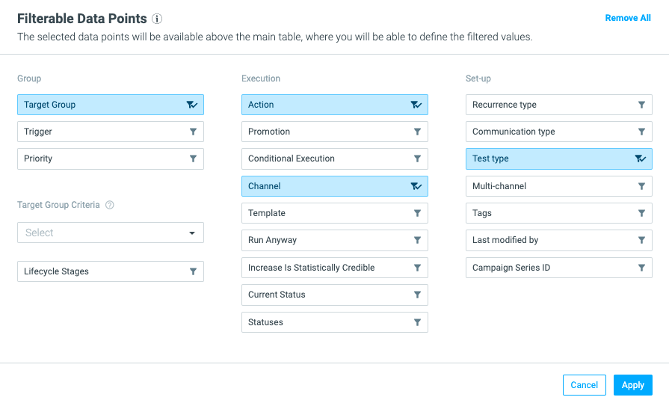
- Go to Mission Control, and click on the filter icon:

- Under the Execution section, click on Channel. Then click Apply.
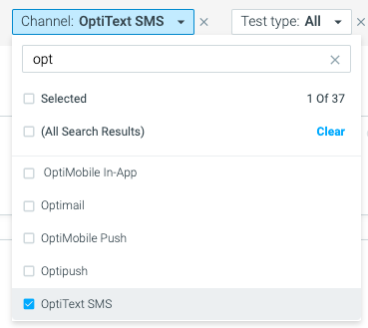
- In the dashboard, you can then select a channel to filter your campaign view. Select SMS.
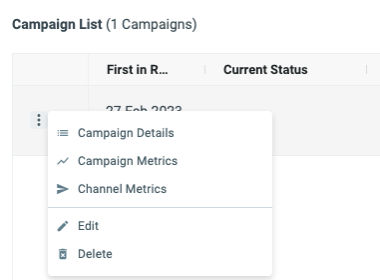
- Next, click on the three dots next to the campaign you want to analyze, and click on Channel Metrics
Take a closer look at the metrics available
Opening Channel Metrics will display the following modal, where you can review all your related SMS metrics, including Sent, Delivered, Clicked, Bounced, and Dropped.
SMS metrics in the campaign analysis are constantly updating (regardless of the Batch Data Update), and the campaign metrics date is set to a week from the execution date, in order to track metrics even a few days after the send date.
Possible Reasons for Bounced SMS
There are some key reasons why the SMS campaign that you sent to your customers could bounce.
1. The number isn't correct
2. Some smartphones only allow the delivery of messages from known numbers
3. Older devices can have an inbox storage limit, which might be at capacity
To find out more about what you can do to reduce your Bounce rate, contact your Optimove CSM.