
Please note:
To unlock this capability, you will need to have added Mobile Push Notifications to your Optimove package. If you can’t see this feature in your Optimove instance, contact your CSM to find out more.
When using Mobile Push as a channel, metrics will be available at the bottom of the Campaign Analysis page.
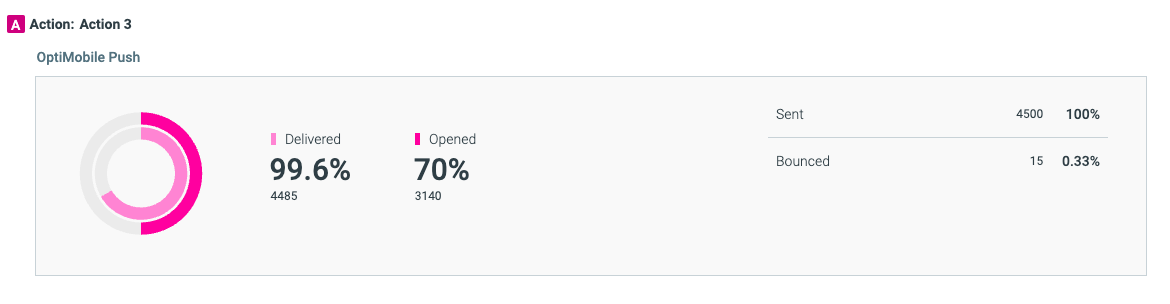
The metrics available are the number of Mobile Push – “Sent”, “Delivered”, “Opened”, “Bounced”, and “Unsubscribed”.
- Sent: The number of unique customers in the selected Target Group minus the number of dropped (non-eligible, no push-token, etc).
- Delivered: The total number of unique customers to which the mobile push was successfully delivered.
- Opened: The number of unique customers who opened the mobile push. An Open is counted when the customer clicks or swipes on the push to open the app. Dismissing the notification but opening the app separately will not count as an Open.
- Bounced: The number of unique customers whose mobile push notifications bounced. Bounces are measured by those that are bounced by the Apple Push Notification Service (APNS) or by Firebase Cloud Messaging (FCM). Bounces are outside of Optimove's control.
Explore Metrics in Mission Control
You can review Mobile Push channel metrics in Mission Control.
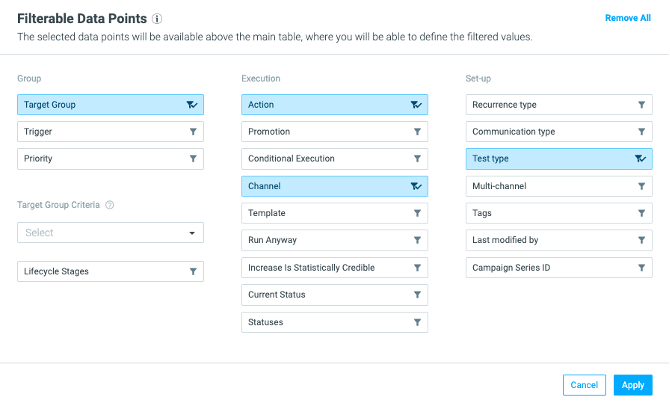
- Go to Mission Control, and click on the filter icon:

- Under the Execution section, click on Channel. Then click Apply.
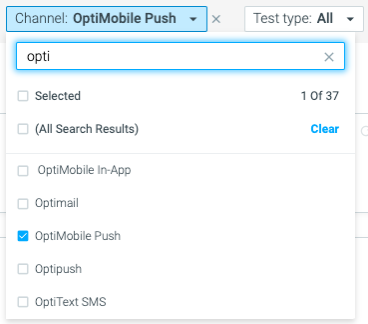
- In the dashboard, you can then select a channel to filter your campaign view. Select Mobile Push.
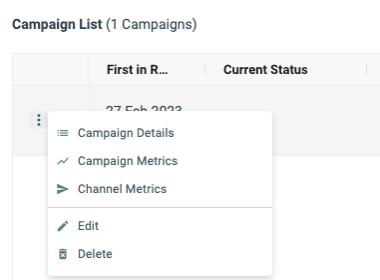
- Next, click on the three dots next to the campaign you want to analyze, and click on Channel Metrics.
Take a closer look at the metrics available
Hover over the metric to show additional details.
Clicking on the numbers will redirect you to the Customer Explorer to explore the specific customers. For example, the customers who opened the push notification.
Mobile metrics in the campaign analysis are constantly updating (regardless of the Batch Data Process), and the campaign metrics date is set to a week from the execution date, in order to track metrics even a few days after the send date.
Possible Reasons for Bounced Mobile Push
There are a few reasons why a customer may appear as Bounced after sending your Mobile Push campaign.
1. Message Payload Issues
2. Incorrect FCM or APNs Credentials
3. Google or Apple Server Errors
4. The user uninstalled the app
If you are concerned that you may be experiencing one of these issues and would like some assistance, please contact your CSM.