
Our native HubSpot integration allows you to automatically create or update contacts in HubSpot based on campaign participation. This helps you seamlessly capture new leads, enrich existing contact profiles with campaign data, and trigger HubSpot workflows.
The setup is a two-part process: first, you'll connect your HubSpot account to a Brand, and then you'll configure individual campaigns to send data.
Part 1: Connect Your HubSpot Account to a Brand
This is a one-time setup step to authorize the connection between Gamify (formerly Adact) and your HubSpot account.
- In your Gamify by Optimove account, navigate to Settings → CRM Integrations.
- Find HubSpot in the list and click "View Integration".
- Choose the Brand you wish to connect the integration to and click "Add new connection"
- A pop-up window will appear, prompting you to log in to your HubSpot account.
- Follow the prompts to choose your HubSpot account and grant the necessary permissions.
- Once authorized, the connection will appear as active for your Brand.
Part 2: Configure a Campaign to Send Data to HubSpot
After the main connection is active, you can configure individual campaigns to send new leads or prize winners to HubSpot.
Choose Your Trigger Event
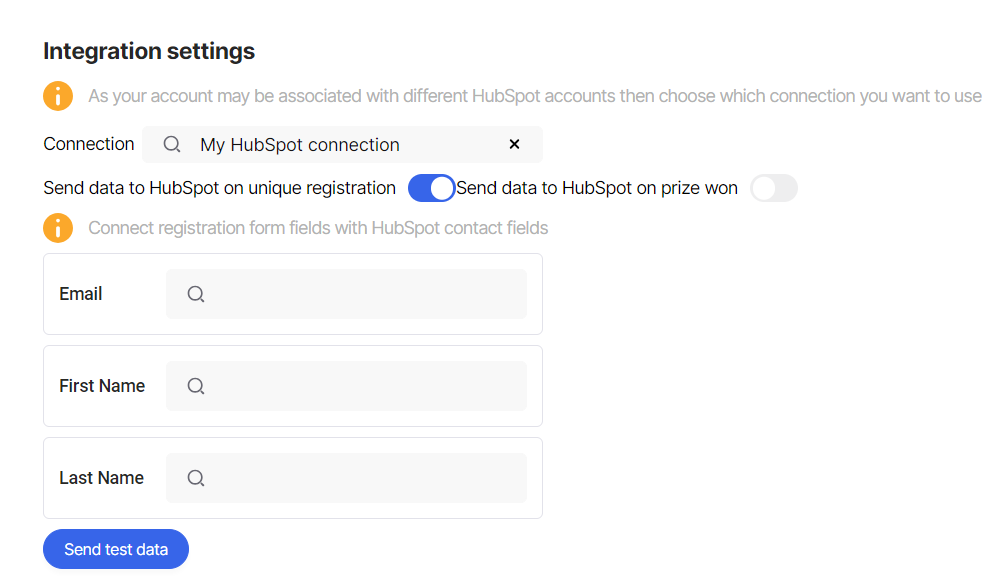
Open the campaign you want to integrate and navigate to its Integrations → Connect CRM tab. Select your active HubSpot connection, and then choose the Trigger Event that will send data:
- New Unique Lead Created: Creates or updates a contact as soon as they submit the registration form.
- New Assigned Prize Created: Creates or updates a contact only after they have won a prize.
Map Your Data Fields
The final and most important step is to tell the system which campaign registration fields should map to which contact properties in HubSpot.
For each HubSpot property (e.g., First Name, Email), select the corresponding field from your campaign's registration form from the dropdown menu.
Save and Publish
Save your integration settings. Your setup is now live! New participants who meet your trigger condition will be automatically created or updated as contacts in HubSpot.