
If your campaign's leaderboard is empty or not displaying results as expected, it's typically due to one of two common setup issues. This guide will walk you through what to check.
Troubleshooting Checklist
-
Check 1: Is your campaign in 'Live' status?
Leaderboard data is only recorded for campaigns that are set to Live. The Draft status is designed for building and previewing your campaign, but it does not save any participant data or scores.
To fix this: You must publish the campaign to begin recording data. After your testing is complete, you can easily clear all test data from your analytics.
- For instructions, see our guide on Publishing a Campaign.
- To clear test data, refer to our guide on Resetting Campaign Analytics.
-
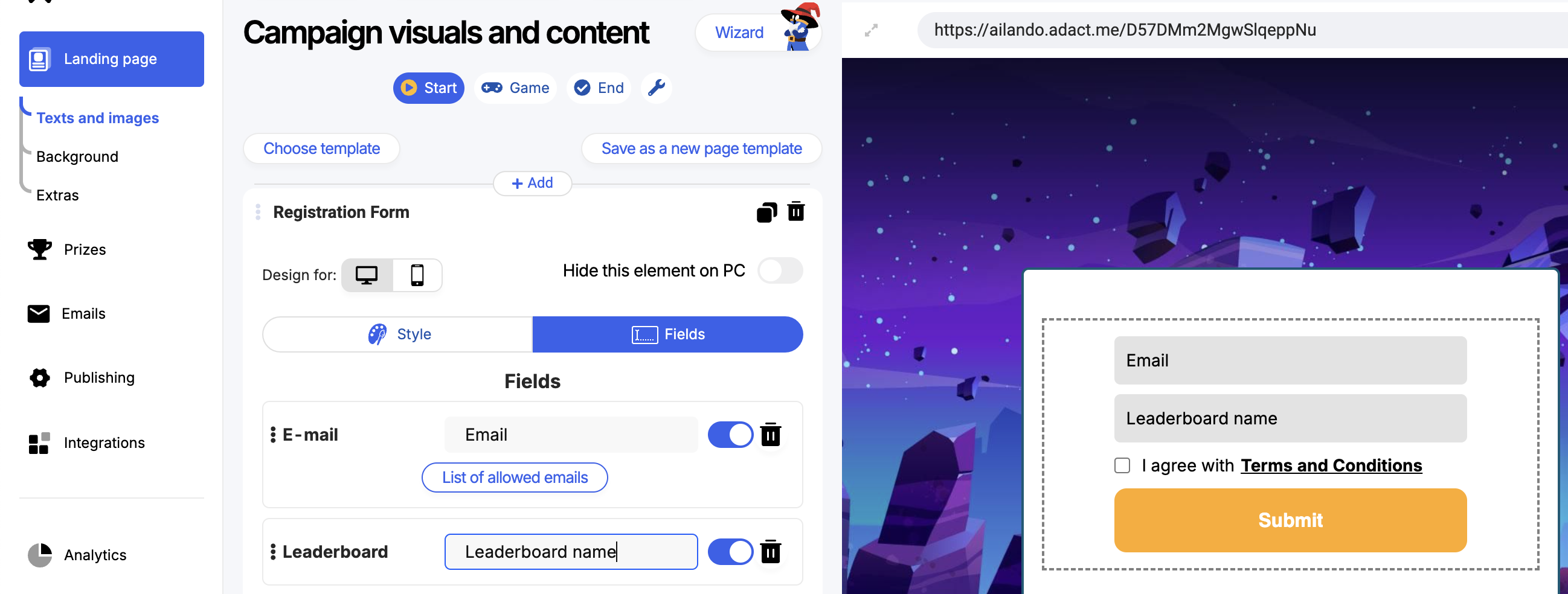
Check 2: Does your registration form include the 'Leaderboard Name' field?
The leaderboard populates based on data entered into the Leaderboard Name field in your registration form. If this field is missing or disabled, the system has no data to display.
To fix this: Go to your campaign editor and select your registration form element. In the form's settings, ensure that you have added the 'Leaderboard Name' field and that it is enabled for participants to fill out.
Still Having Trouble?
If you have confirmed both of these points and your leaderboard is still not displaying correctly, please submit a support ticket for further assistance. Our team is happy to help investigate.