
The Customer 360 page brings together all the data available on individual customers. From their demographic details to the history of their interactions with your brand, including campaign history.
This consolidated view allows you to easily understand and analyze the activity history and behavioral trends of any individual customer.
Customer Marketing Impact
The first section displays a set of high-level metrics, one of which can be customized to your specification.
Under the customer marketing impact, you can discover the campaign activity directed at any particular customer and determine how effective your campaigns have been. It also allows you an overview of which marketing actions the customer has received, and via which channels, during the selected period.
You can select one of the analysis range options from the drop-down list.
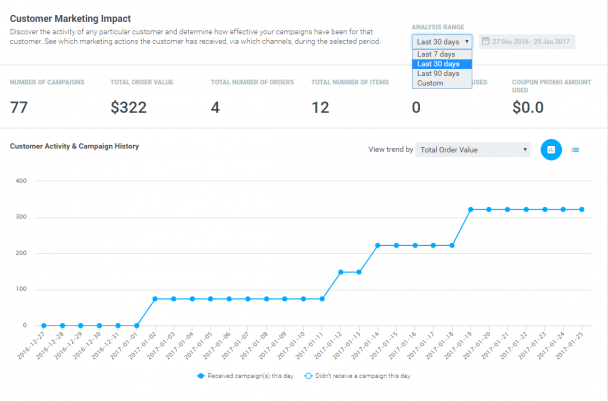
The set of campaign metrics displayed is fully customizable.
The Customer Activity & Campaign History chart presents the cumulative value of the selected metric within the chosen period in a Report or a List View.
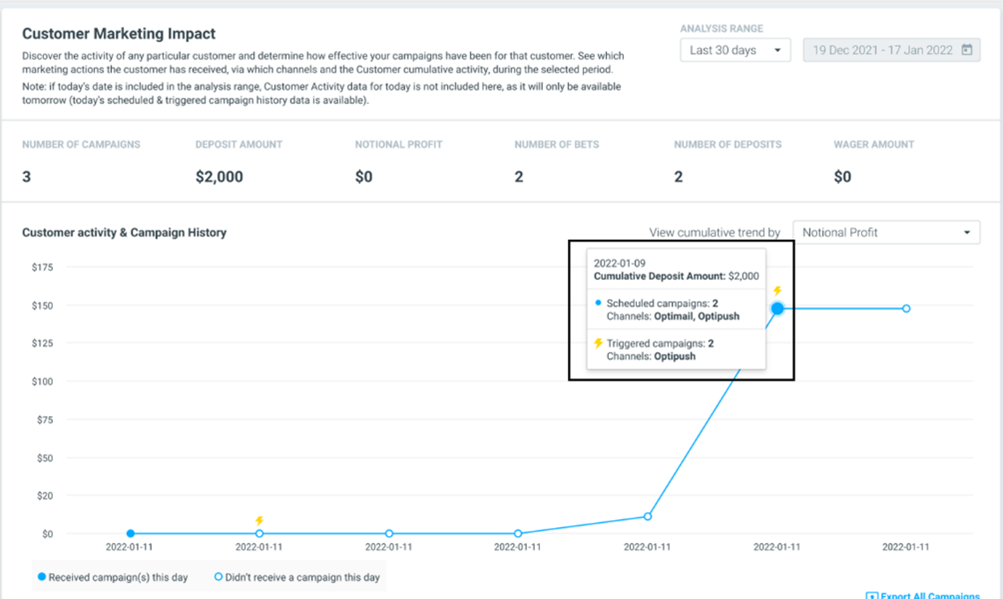
In the chart, colored circles signal the days where a campaign was sent to the customer, while blank circles signal that no campaigns were sent to the customer on that day.
For real-time triggered campaigns, a lightning symbol is displayed over the circle.
By hovering over the circle, you can view the breakdown of the triggered and/or scheduled campaigns sent on the specific date and the channels from which they were sent.
Below the chart is the summary of campaigns, presenting the relevant Target Group, trigger (in case the campaign was a realtime one), Action, Channel, Template and Promotion Name. Click on the 'Columns' pane to customize your table.
You can also view the specific templates the customer received for each email campaign by clicking the 'Show' icon on the right-hand side.
The personalization tags of the template will also be populated with the nearest value*, enabling you to see almost the exact template a customer received helping marketers QA their campaigns and providing customer service agents with a holistic view of your marketing communications.
Please note
*The nearest value will be based on the nearest customer snapshot dates to campaign execution. This is relevant for dynamic values only (e.g. order amount, account balance) not constants (E.g. name, age).
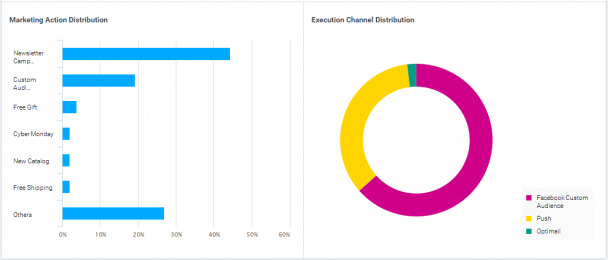
The Marketing Action and Execution Channel charts provide the distribution of the particular customer campaigns by action and channels. This gives you an insight into the diversity of your offers and the channels you used to target this customer.
Purchase History
The Purchase History chart provides you with an overview of what the particular customer has purchased/what game the customer has played from up to 90 days back. This insight can help you track customers' activity and transactions along their journey with your brand, and match this to Target Groups and Campaigns a customer was allocated to on any given day to understand the impact of your marketing efforts.
To add new columns into the Purchase History table, click on 'Select Attribute' and customize your table.
Customer Snapshot
Finally, the customer snapshot enables you to review the customer activity across all the existing attributes and to identify changes in customer behavior. You can export this customer’s entire snapshot history to CSV in order to analyze this further.
In summary, this report has been designed in order to enable you to better understand specific individual customer behavior and to review your campaign activity and its effectiveness. We know that this will be most useful when investigating the smallest details of specific customers who stand out and what lessons this can teach you about the bigger picture.
Example use case
Investigate churn risk after a negative gaming experience
After customer support flags a player who reported a negative gaming experience, such as a failed withdrawal or gameplay issue, marketers open the specific player in Customer 360 to understand the full context. The page shows that the player has moved into a dormant lifecycle stage, alongside a sharp decline in gameplay and transaction activity following the incident.
Marketers then review campaign exposure to see which bonuses, promotions, and messages were delivered before and after the issue, and check purchase history to confirm the drop in value.
With this insight, marketers trigger a churn prevention campaign tailored to the player’s history and value, and use the learnings to refine future messaging, offers, and escalation handling for similar cases.
After customer support flags a player who reported a negative gaming experience, such as a failed withdrawal or gameplay issue, marketers open the specific player in Customer 360 to understand the full context. The page shows that the player has moved into a dormant lifecycle stage, alongside a sharp decline in gameplay and transaction activity following the incident.
Marketers then review campaign exposure to see which bonuses, promotions, and messages were delivered before and after the issue, and check purchase history to confirm the drop in value.
With this insight, marketers trigger a churn prevention campaign tailored to the player’s history and value, and use the learnings to refine future messaging, offers, and escalation handling for similar cases.