
How the Integration Works
Optimove connects with the Symplify API to retrieve the available SMS templates from each Symplify “project.”
Setting Up the Integration
1. Connecting Optimove to the Symplify API
In order for Optimove to connect to the Symplify API, the Optimove integration staff must receive the following details provided by the marketer:
- API URL
- Symplify Customer ID
- User Name
- Password
- API Token
2. Registering the Symplify Event Listener with Optimove
In order for Optimove to notify Symplify when a campaign is ready, Symplify must register an event listener URL with Optimove via the Optimove API. Each Symplify customer requires its own listener URL.
Executing Symplify SMS Campaigns Using Optimove
1. Retrieving the List of SMS Templates
When the marketer sets up an SMS campaign in Optimove to be sent via Symplify, Optimove retrieves a list of all available projects and SMS templates (Symplify “triggers”) via Symplify's API. The marketer selects the desired template for the campaign from a drop-down list and can also view a preview of the SMS itself from within Optimove.
2. Scheduling an SMS Campaign in Optimove
The marketer sets up a Symplify SMS campaign by creating a campaign in Optimove (aimed at a particular Target Group on a particular date or sequence of dates). After selecting Symplify SMS as the campaign’s execution channel, the marketer must specify the desired Symplify project, Symplify template (“trigger”), and time of day.
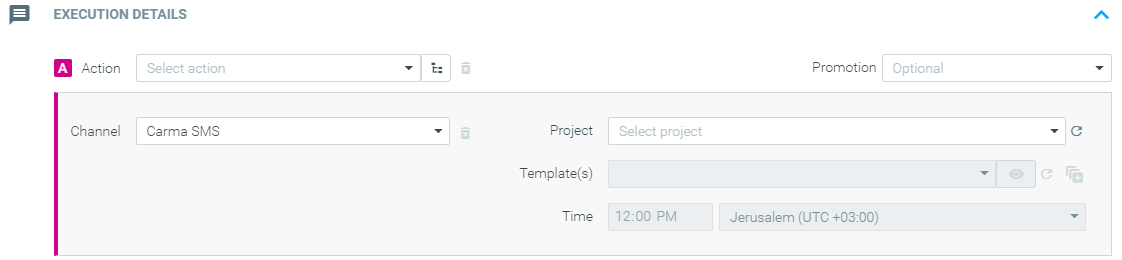
|| Important note: each Optimove campaign can only be attached to a single Symplify project. Multi-template campaigns can be sent so long as all the templates exist within the same Symplify project, but cross-project campaigns are not supported.
3. Automatic Campaign Execution
Once Optimove has prepared the campaign data on the scheduled execution date, the Optimove software notifies Symplify that a new campaign is ready, via the registered event listener. The Symplify software then retrieves the campaign details (template, time of day, and customer ID list) from Optimove’s API. Symplify then executes the campaign to the specified customers at the specified time of day.