
This article covers everything you need to know about Deliverability, including metrics, definitions, frequently asked questions, and calculations.
Campaigns Deliverability Report
Within Optimove’s BI Studio, you’re able to easily monitor the performance and likelihood of deliverability of your campaigns to customers’ inboxes by utilizing your Campaigns Deliverability Report. For a detailed video and how-to describing in detail how to utilize this powerful tool, click here.
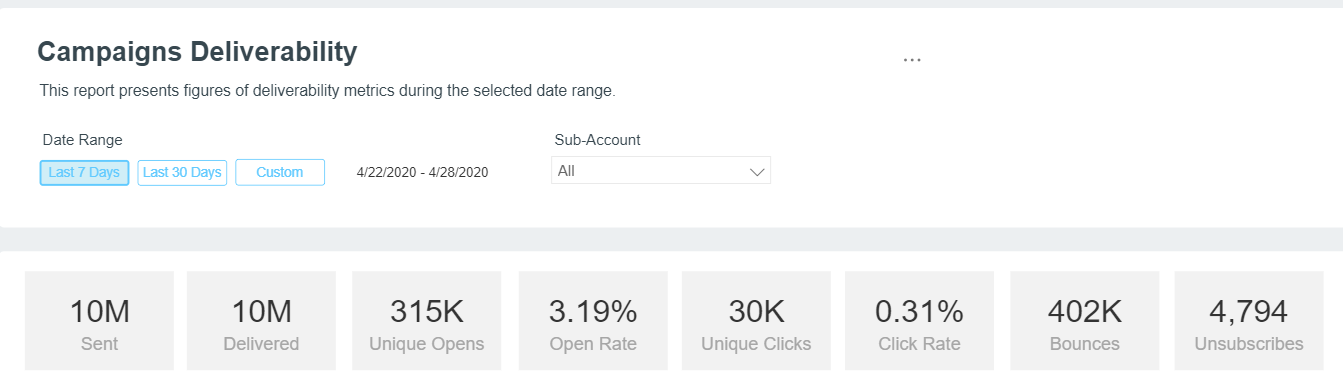
Bounced is an aggregate of both blocked and bounced events. Should you notice a spike in your bounced events, a sharp or sudden decline in opens, or anything that points to an email reputation issue, contact your CSM for the appropriate next steps.
Why are the numbers I see in my Campaigns Deliverability dashboard different from the numbers in the SendGrid UI?
There can be several reasons why your metrics aren’t aligned between the two platforms.
- Sent vs. Delivered/Delivery Rate: Every time a message is scheduled in Email, that “request” is passed to our delivery network with the intention to send based on your specified segmentation and campaign details. However, if you cancel the request or reschedule, the original request is still accounted for and will create an anomaly in the delivery rate. The delivery rate is based on # of messages delivered/# of requests sent.
- Time Zone: Verify if both your Optimove account and the delivery network account are configured in the same time zone.
- Engagement Data: While the delivery network aggregates engagement data like opens and clicks on a daily basis by date (i.e., when the open or click takes place), Optimove aggregates this data by date based on when the campaign was sent.
Sent
In Optimove, your sent volume reflects the total number of emails that have been sent to our delivery network based on your segmentation preferences, actions, and other campaign preferences.
Delivered
In Optimove, the number of emails delivered reflects the volume of emails that have been successfully received by a subscriber’s ISP.
What’s the difference between sent and delivered?
Sent is the total number of messages that you have targeted based on a set of segmentation rules and campaign preferences. Delivered speaks to the actual number of emails that are successfully accepted by the receiving server (i.e., the ISP) after excluding invalid emails, bounced emails, blocked emails, dropped emails, and any additional exclusions included at either the Email level or the delivery network level.
Does “delivered” mean that my email has been delivered to my customer’s inbox?
No. Delivered simply means that your message has been successfully received by the server that accepts messages on behalf of your customer, like their ISP. However, your message can be delivered to an inbox, a spam folder, or a junk folder and still be considered “delivered”.
Open
Every email sent contains an invisible image, or tracking pixel, that is used to track user engagement. When your recipient opens your message, the image is loaded and returns an open event for tracking purposes.
Not all ISPs load images by default, which can create discrepancies in reporting. Outlook, for example, does not load images by default until the subscriber notes that the sender is trusted.
Click
Every email sent through Email will have its links automatically wrapped for click tracking purposes, and traffic is passed through to our delivery network.
Note, however, that HTTPS links are not supported using automatic click tracking link wrapping, and there are several options available to have links tracked in this instance.
When adding a link in your email templates, please make sure to insert the full URL (including https://).
I’m seeing more clicks than opens in my report. Is that even possible?
Not all ISPs allow for automatic download of email images, therefore making it so that the invisible image/tracking pixel used to track opens doesn’t track properly. In these cases, you’ll see a click, yet no open, which will account for higher clicks than opens.
I’m interested in getting my customers’ open and click data via API vs. just from the Campaigns Deliverability Report. Is this possible?
It sure is. For more information, click here.
Bounces
A bounce event is a message Email’s servers receives back from the ISP’s feedback loops after attempting to send an email to a user.
In your Campaigns Deliverability Dashboard, both permanent and temporary bounces are aggregated for reporting purposes.
A bounce is a permanent issue with the server or the user's address. Common reasons for a bounce might be a nonexistent email address or the domain not existing. Once an address bounces, Optimove will automatically suppress that address from receiving messages again because bounces have a negative impact on email reputation and deliverability.
Is there a way to also exclude my bounced addresses from Target Groups so that my target counts are more accurate?
Yes. We can create custom criteria that will only target users not found in a suppression list (i.e., unsubscribes, spam complaints, bounced). For more information on having this created for your account, contact your CSM.
Blocks
A block event, like a bounce event, can also negatively impact your email reputation. However, unlike a bounce event, a block event isn’t as permanent and will not be automatically suppressed from receiving messages once blocked.
Similar to soft bounces, common reasons for an address to be blocked include blacklisting, if an ISP believes your email content or sending strategy is spam-like, or if you experienced a temporary technical issue during the send to the receiving server.
It’s recommended that, should you see a spike in the number of messages blocked and a decrease in the number of opens, you reach out to your CSM for a swift resolution.
If my IP has been blocked or blacklisted, should I just buy a new IP and start sending from the new one instead?
No. In addition to your IP, your sending domain is considered when determining your email reputation on an ISP-by-ISP basis. Therefore, jumping from a poor IP with your existing domain to a new IP with the same domain won’t win you any points with the ISPs. In fact, there’s a term for that – it’s seen as a form of spam-like sending called “snowshoeing”, and you will quickly be blocked or blacklisted. The recommendation is to follow the sender's best practices, be consistent, and be patient.
How can I tell if I’m suffering from a legitimate blocking issue or if it’s one of those rolling blocking things I’ve heard about that some ISPs do?
While it’s normal for ISPs to block senders from sending directly to inboxes here and there – even when best practices are being followed, as a means for monitoring an IP, any block that lasts longer than 24-48 hours is cause for concern.
Unsubscribe
An unsubscribe event reflects the action taken by a user when they actively opt out of receiving emails. If Optimove is managing the unsubscribe process, these unsubscribed addresses will automatically be added to a suppression list. If you are managing your unsubscribe process, these addresses will need to be provided as part of the Batch Data Process as an attribute for compliance purposes.
Unlike bounces, blocks, and spam complaints, unsubscribes do not have a negative impact on email reputation and deliverability.
What if I want to give my users more options for subscription than opt-in or opt-out – do you allow for a preference center?
Yes. Within Optimove, attributes can be created based on customer preferences that reflect the frequency and type of messages they’d like to receive – giving them the opportunity to opt down rather than opt out. For more information on implementing a preference center for your account, please contact your CSM.
Invalid Emails
An invalid email event occurs when you attempt to send to an address that isn’t formatted properly. Examples include addresses missing the “@” sign, addresses with special characters that aren’t recognized by servers, or inclusive of spaces.
This is not the same as an address that is formed correctly but isn’t a valid (i.e., existing) address. An invalid address will not send from our delivery network and therefore will not impact email reputation or deliverability because we are able to determine that there is no existing destination to send it to.
Drops
Our delivery network will automatically drop a message from being sent to a specific email address in order to protect your reputation. Because we track bounces, spam complaints, and unsubscribes for each of our clients, when you attempt to send an email to a user who exists on one of these suppression lists, our delivery network will automatically drop the message from being sent.
Because this occurs prior to the message being sent, this does not negatively impact email reputation or deliverability.
Deferrals
A deferral event occurs when an ISP is not ready to accept an email message from your IP address. Rather than blocking or bouncing the message, our delivery network will continue to make attempts to deliver the message for up to 72 hours due to the temporary server delay. If, after 72 hours, the message still cannot be delivered, it will be considered a block event.
It is possible to have the time period for attempting to resend a message changed for deferrals from 72 hours to a different time period. To have this modified or for additional support, contact Deliverability Services.
I’ve been seeing a lot of deferred messages recently for my account. What could this mean?
There are several reasons an ISP might be deferring or delaying the receipt of your messages. Some common reasons include that the ISP no longer recognizes the IP from which the messages are being sent – so it’s important to make sure you haven’t changed your DNS configuration, which could have invalidated your authenticated domain in some way. Another reason could be that you’ve started to send much higher volumes from your IP address than anticipated. This could be solved by simply assigning more IPs to your account. This will allow you to throttle your messages across multiple IPs.
Spam Report
A spam report is recorded when a user marks an email that has been sent to them as spam or moves an email sent to them from their inbox to the spam folder.
Spam complaints have a negative impact on your email reputation and deliverability. Spam reports can only be obtained from ISPs that provide a feedback loop.
Metrics Calculations
Metric |
Calculation |
|---|---|
Open Rate |
Total # of Opens/# Emails Delivered |
Click Rate |
Total # of Clicks/# of Emails Delivered |
Click to Open Rate |
Total # of Clicks/Total # of Opens |
Spam Rate |
# Spam Reports/# Emails Delivered |
Bounce Rate |
Total # of Bounces + Total # of Blocks/# of Emails Requested to be Sent |
Unsubscribe Rate |
Total # of Unsubscribed/# of Emails Delivered |