
Please note:
To unlock this capability, you will need to have added DynamicMail to your Optimove package. If you can’t see this feature in your Optimove instance, contact your CSM to find out more.
If you're just starting off with DynamicMail, quickly getting a sense of the most important terms and elements of the creator is going to help you quickly make the most out of it.
In this article, we'll cover some of the important DynamicMail terms and elements that you should definitely know.
Below is there's an image of the different elements on the “My Components” page:
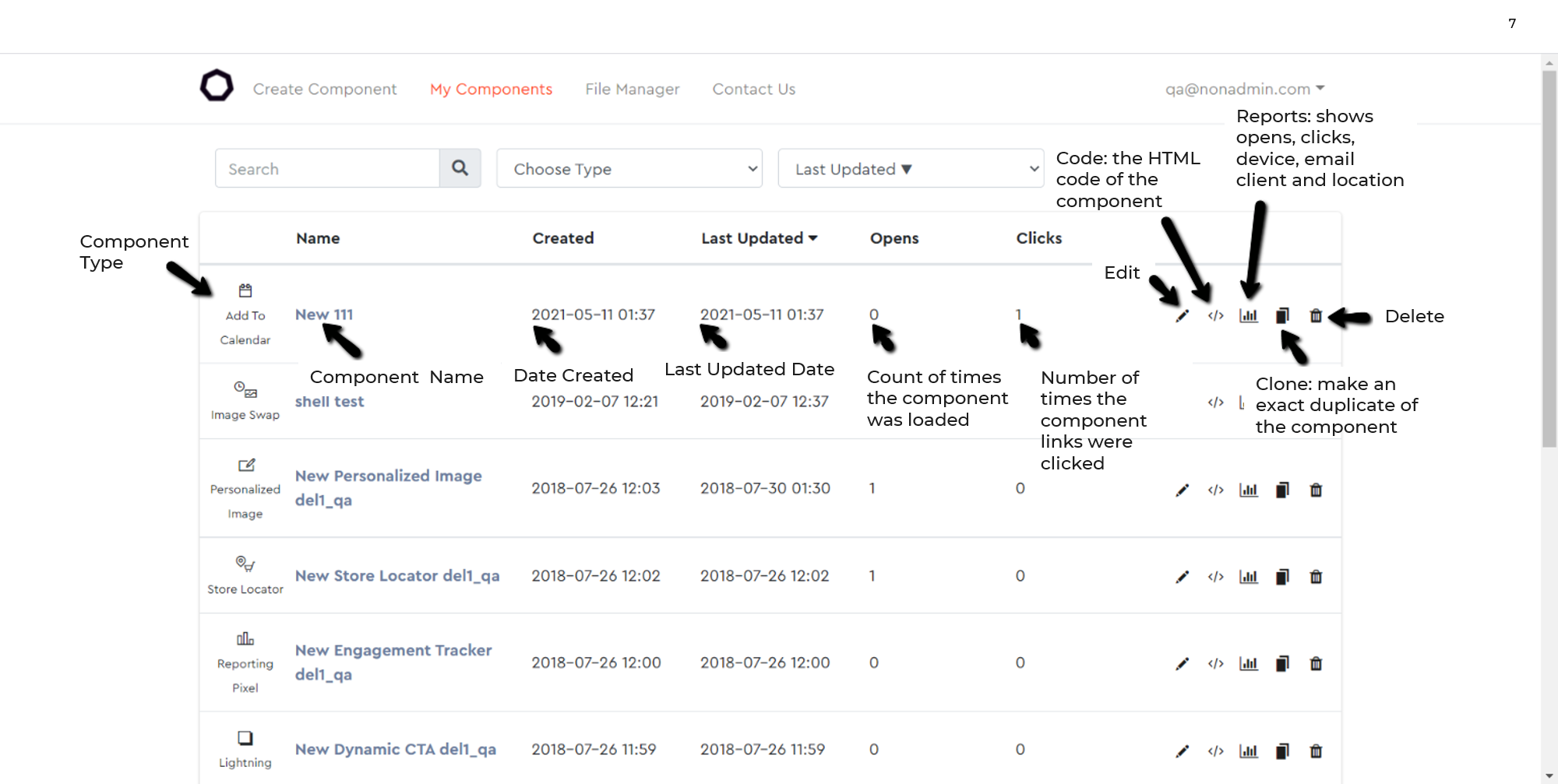
DynamicMail terms
- Clone - copy a component. Using this action you can create a variant of a custom component to reuse.
- CTA - Call To Action. Usually, a button or banner with an important message or an offer with a link.
- CTR - Click Through Rate. The ratio of opens to clicks in percentages.
- Email Client - the email program a subscriber uses to view an email such as Gmail, Outlook, Yahoo, Apple Native Mail, etc.
- Fallback - in the case when the subscriber opens an email with an animation or interaction that is not supported by the email client a fallback is what is presented to the subscriber.
- File Manager - the place in the creator where all of your assets live.
- Anytime you upload or use an MP4 video, image, custom font, etc. it will be saved for later use in the File Manager.
- IP Address - Internet Protocol Address. What we use to determine a subscriber’s location on the open. If a subscriber is using a proxy, such as Gmail, we will get the proxy’s IP which is inaccurate.
- Merge Tag - a way of including dynamic content in an email. These values are replaced by the email’s ESP to further personalize the email (for example saying Hi, First Name). Can also be called personalization tags.
- Snippet - the piece of code the creator will give for a component. This is what’s added to the HTML template. Also known as embed code.
- PII - Personal Identifiable Information. We don’t collect any personally identifiable information from emails. One of the ways that we do this is by not supporting the use of open-text forms in email. Collecting this type of information can be considered illegal in some locations.
- Custom Development - Custom Development involves any additional work needed outside of the Creator and is usually sold at an additional cost. This can be anything from enhancing a Creator component (for example pop-up with a video inside) or a new custom component (for example forms). Specific Custom Development use cases are mentioned within each component.