
Introduction
After investing in costly acquisition campaigns, often a large portion of your customer base is yet to carry out any monetary activity. By understanding the probability of each customer converting, you will be able to identify what are the most impactful acquisition channels, as well as how to treat each customer with welcome offers and checkout incentives that will guide them through the conversion funnel.
- Easily segment customers based on their likelihood to convert
- Allocate your promotional budget in the most optimal way
- Identify your next paying customer ahead of time to build strategic conversion campaigns
How to Use
The Conversion Rate model is available as part of your customer profile and can be used to define target groups and explore them in Customer Explorer.
- Under the Explore tab, go to Customer Explorer
- Click + New Target Group
- Name your Target Group and click on + Selection
- Click on Conversion Rate
- Select segments from Highest to Lowest you want to target
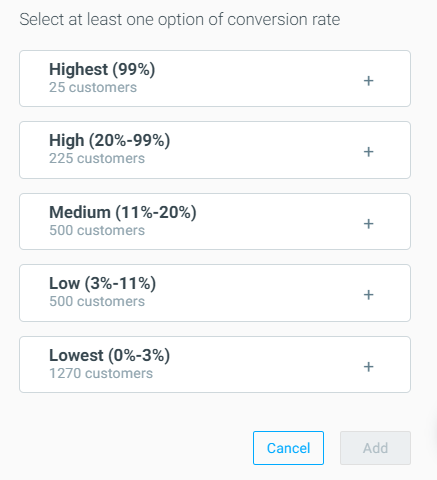
Draw in your next paying customer
Previously you had to guesstimate what type of customers were most likely to convert, making it difficult to be strategic in your conversion campaigns. Now, you can select the ‘Highest’ to ‘Lowest’ segment in the Conversion Rate criteria, making it easier than ever to decide how you should allocate your marketing budget. Specifically, we recommend these two approaches when using the Conversion Rate model:
- Personalize promotions based on a customer’s likelihood to convert. Let’s say you are sending out a welcome campaign to customers that signed up for your newsletter. Rather than sending all these customers the same promotion, customers with a lower likelihood of converting can be targeted with a higher discount. To further improve profitability, segment customers with a low probability of converting and a high future value prediction to focus your resources on revenue-maximizing campaigns.
- Analyze customers with a high probability of converting to optimize your acquisition campaigns. You may look to reduce your acquisition spending using cheaper acquisition channels, however, this may lead to acquiring customers that are less likely to become paying customers. Instead, analyze which customers have a high likelihood to convert to understand which acquisition channels bring in high-potential customers, and optimize your campaigns accordingly.
Using Additional Attributes
a) Conversion Probability Score
This attribute allows you to segment customers based on their predicted Conversion Probability.
You can use this value to build customer groups with similar likelihoods to convert, and you can customize the value range to suit your strategy.
Examples:
- Conversion Probability Score >= 70% will segment customers with a 70% or higher predicted likelihood to convert.
- Conversion Probability Score < 20% will target low-likelihood customers for special win-back offers.
b) Rank in Conversion Probability
This attribute ranks customers by percentile based on their Conversion Probability score across your entire customer base. It is useful when you want to target customers relative to others in the same LCS.
Examples:
- Rank in Conversion Probability= 100 will segment the top 1% of customers with the highest likelihood to convert.
- Rank in Conversion Probability>= 80 will segment the top 20% most likely to convert.
This approach helps create scalable tiered segments, from high to low probability groups.
Understanding the Conversion Rate Model
The Conversion Rate attribute is an AI-generated predictive metric that is measured for every customer in your database in the registered-only/non-deposited lifecycle stage.