
Please note:
To unlock these capabilities, you will need to have added OptiMobile channels to your Optimove package. If you can’t see this feature in your Optimove instance, contact your CSM to find out more.
Image Guidelines for Mobile Push Notifications
The 16:9 aspect ratio works best on both platforms (iOS and Android).
If your image is not 16:9 aspect ratio, we would recommend that the main area of interest fits in the central 16:9 content area of the image, and make the top/bottom "bleed" areas only contain supplemental scene elements.
Our push preview shows both the collapsed and expanded states for iOS and Android devices when you interact with it, so can be used to get an idea of how this feels.
In terms of dimensions, the width of the iPhone 13 is 1170 pixels and the Google Pixel is 1080 pixels so if possible use an image with that width (max file size 10Mb).
Our media resizer will downscale (and cache at the edge) for phones with smaller screen resolutions.
Image Guidelines for In-App Messages
The latest iPhone 13 and Google Pixel 6 both have aspect ratios of 20:9.
For images that are not of this aspect ratio, we will center-crop to ensure that the background is filled. So, for example, this square image...
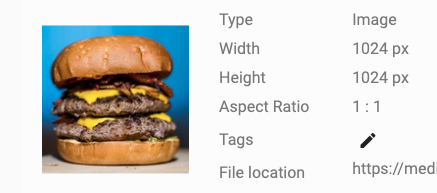
It has an aspect ratio of 1:1, therefore it will be cropped as follows...
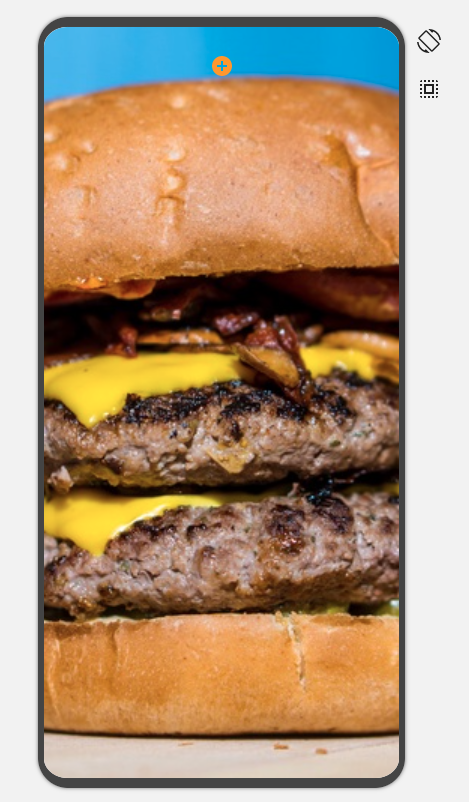
Acknowledging that 20:9 isn't a common aspect ratio, for background images we would therefore recommend portrait images with a height at least that of the iPhone 13 (2532 pixels) or Google Pixel 6 (2400 pixels) with a maximum file size of 10Mb. Keep the main content in the center and treat the far left and right as bleed areas that can be cropped.
Our media resizer will then automatically downscale (and cache) the image for different devices/screen resolutions.