
Customer support is a critical touchpoint in every customer relationship. Data gathered during support interactions can (and should) be used to inform your marketing campaigns.
Using the Optimove-Zendesk integration, you can:
- Enrich your Optimove Single Customer View with Zendesk customer support data and use it to better understand your customers and how to support interactions that influence them.
- Trigger personalized campaigns following customer support interactions and react to changes in a customer’s status.
Zendesk customer support data is updated within Optimove in real-time, with no need to wait for the batch data update. That means that as soon as a customer’s support status has changed, or a new request comes in, you can react with perfectly personalized campaigns via Optimove.
Common Use Cases
To give you a better idea of how you can leverage the Optimove-Zendesk integration, here are some common use cases that can be addressed using Optimove’s Zendesk integration.
If we had you at “Zendesk + Optimove”, click here for step-by-step integration instructions.
Pause all promotional emails to customers with open support tickets
Imagine that one of your customers is having difficulty completing an online purchase.
The customer has opened a ticket with your support team and is waiting for a response.
Meanwhile, this customer is also scheduled to receive a campaign announcing an online flash sale. Because, likely, receiving a marketing message before the purchase problem has been resolved will annoy the customer, this customer should not receive any promotional offers until the ticket is resolved.
Since Zendesk customer attributes are available in Optimove, you can temporarily exclude customers with open support tickets from receiving marketing campaigns.
To do so, add the relevant Zendesk attribute as an exclusion criterion to your campaign target groups.
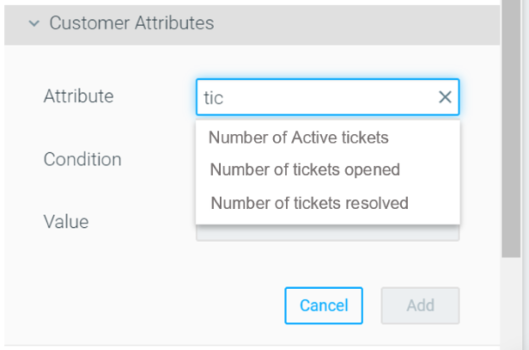
Leverage Zendesk support data while exploring customers in Optimove
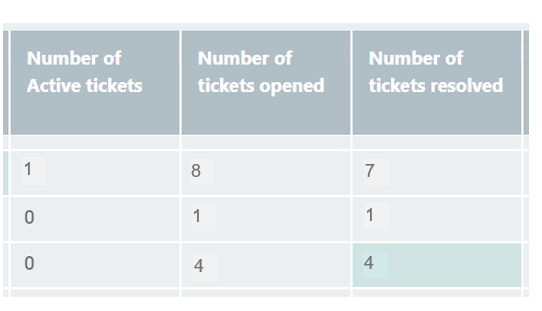
Once Zendesk data is available within Optimove, you will have access to attributes such as “Number of tickets opened ” and “Number of tickets resolved.”
Combining these customer attributes with others in Optimove’s Customer Explorer can help you discover new insights regarding customer behavior as it relates to supporting interactions.
These attributes can also reveal new insights into customer groups, such as the churn probability of customers with specific open ticket thresholds.
Leverage these insights to create tailored campaigns for customers before they reach the number of tickets that correlates with higher churn propensities.
Ask for a review one day after a customer ticket was successfully resolved
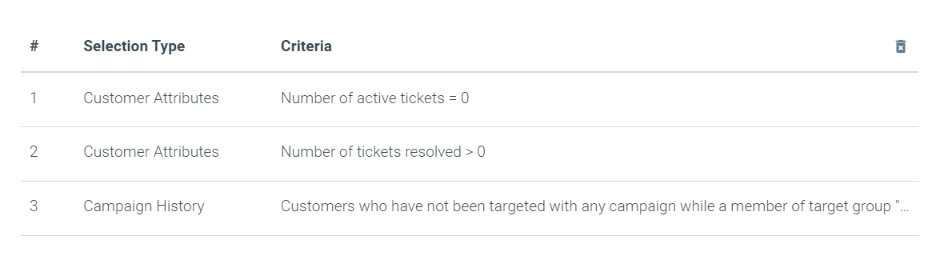
While an open ticket can indicate a sensitive time for a customer, a resolved ticket might be a good time to get some positive customer feedback. If support is one of your strong suits, follow up on a resolved ticket with a review request, and leverage customer satisfaction for social proof. It is easy to automate this kind of campaign by creating a target group with the following customer attribute: Number of tickets resolved > 0.
To ensure that customers aren't targeted twice with this campaign (e.g., they had 2 tickets resolved in the past 48 hours), add a Campaign History attribute that uses the custom "have not been targeted" scenario within a timeframe of 2 days.
Setting Up the Integration
Integrate Optimove with Zendesk in a few minutes, using this step-by-step guide.
Please contact your Customer Success Manager with any questions you might have about this integration.