
Always-exclude target groups allowing you to specify groups of customers/visitors who will never receive any campaign. This is useful for scenarios in which you know that specific groups of customers/visitors should be excluded from all marketing actions (those who have opted out from receiving any communications, those who you are not allowed to target for legal reasons, etc.).
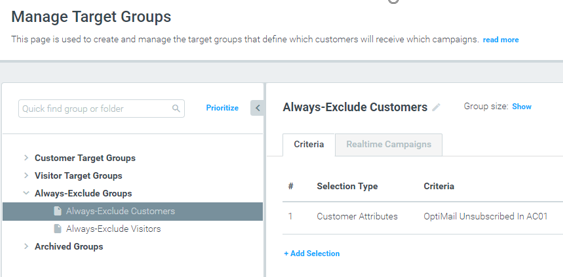
Two default exclusion groups are available on the Manage Target Groups page (under the “Always-Exclude Groups” category). These groups are empty by default; you can use them to build your
exclusion criteria.
|| Please Note: You can restrict editing of the Always-Exclude target group to admins only. Contact your Customer Success Manager to enable this option.
Learn more here.
A note on "Always Exclude" target groups
The “Always Exclude” target group updates once a day during the batch-data process. As a result, instead of using a real-time attribute as part of an “Always Exclude” group, it is recommended to include the attribute as a specific condition within the relevant target group.
For example, if you are looking to ensure that customers who blocked your communications earlier today will not receive anything until tomorrow's batch-data process, instead of creating an "Always Exclude" target group with blocked users, make sure that the "Blocked User Equals No" attribute is added to the relevant target group so that it will update in real-time.