
Campaign & Target Group Prioritization
If an individual customer is eligible for two separate target groups, which both have campaigns scheduled for the same day, the system will only send the customer one of those campaigns.
|| Prioritization applies to a campaign scheduled for the same day. For campaigns sent on separate days, prioritization has no effect.
Inclusion or Exclusion at the Campaign Level
Target group prioritization allows you to instruct Optimove as to which campaign takes precedence when a customer is eligible for more than a single campaign.
- Exclude All - Selecting this option will ensure that customers who receive a campaign with a higher priority are excluded from this campaign. This is the recommended setting by Optimove.
- Include All - Selecting this option will ensure that customers receive this campaign regardless of whether they also received a campaign with a higher priority.
- By Channel - Selecting this option will allow you to determine the exclusion or inclusion rule at the channel level. Read more below.
- Optimove prevents customers from receiving other campaigns in order to prevent uplift measurement ambiguity.
- Optimove measures the results of the campaign.
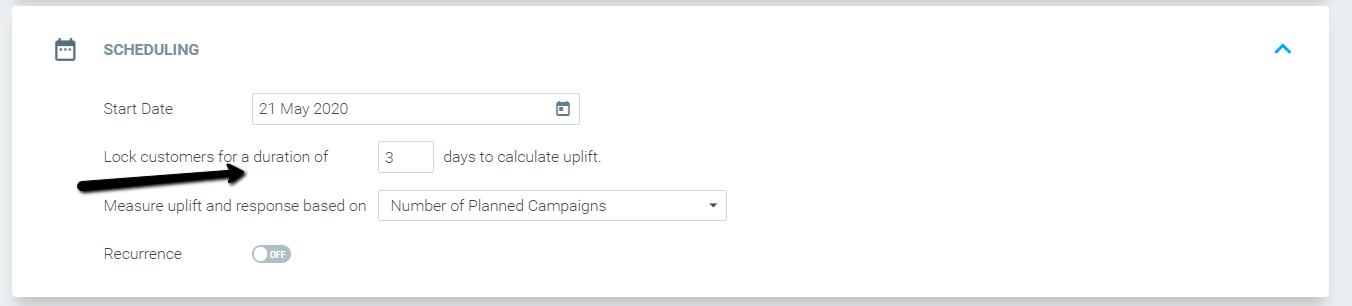
Exclusion or Inclusion by Channel
When considering whether to exclude customers who are engaged in other ongoing campaigns from receiving an additional campaign, you may prefer to exclude customers only if the ongoing campaign uses the same channel that you’re planning on using for your new campaign.
|| Please Note:
Exclusion or Inclusion by Channel is based on the channels each customer was actually targeted through. For example, in A/B test campaigns, where 50% of the customers are targeted through Email and the other 50% through Mobile Push, customers in the Email group count as targeted by Email only, customers in the Mobile Push group count as targeted by Mobile Push only, and customers in the campaign's control group count as targeted by both Email and Mobile Push.
-
Control Groups: Customers in a campaign's Control Group are treated as if they received the campaign on the channels it was set up with, even though nothing was sent to them.
- Include by Channel: they are included, just like customers who received the campaign.
- Exclude by Channel: they are excluded, just like customers who received the campaign.
- Multi-channel campaign: they count as targeted by all of the campaign's channels.
This keeps By Channel rules consistent for every customer in the campaign, whether they were in the test group or the Control Group.
- When choosing “All”, as shown in the screenshot below, Optimove will treat the campaign as if “Exclude All” was chosen.
Same for Choosing “All” and “Include”. Optimove will treat both as “Include All”.
How are auto-priority campaigns with 'By channel' exclusion types prioritized?
- Campaign A is an SMS campaign. Exclusion Type: Include Email
- Campaign B is an Email campaign. Exclusion Type: Exclude All.
- Campaign C is a Push campaign. Exclusion Type: Exclude All.
Optimove first prioritizes the campaign each customer should get. Next, our models will examine the exclusion type of each following campaign in order of prioritization to determine which campaigns the customer is eligible to receive.
Scenario A: The AI Journey Decisioning Agent algorithm determines the following prioritization of campaigns for an individual customer:
1. Campaign B
2. Campaign A
3. Campaign C
Results:
1. Customer receives Campaign B, as it generates the highest uplift
2. Optimove examines the exclusion criteria of Campaign A – Customer receives Campaign A, as customers who are receiving Email campaigns are still eligible for the campaign.
3. Optimove examines the exclusion criteria for Campaign C – Customer will not receive Campaign C as the exclusion criteria is Exclude All.
Scenario B:
The AI Journey Decisioning Agent algorithm determines the following prioritization of campaigns for an individual customer:
1. Campaign A
2. Campaign C
3. Campaign B
Results:
1. Customer receives Campaign A
2. Customer will not receive Campaign C or B, and they exclude all customers
Always Exclude Groups
Exclusion by Target Group is another exclusion option, which is available in the Target Group list as a separate Target Group category named “Always-Exclude Groups”.
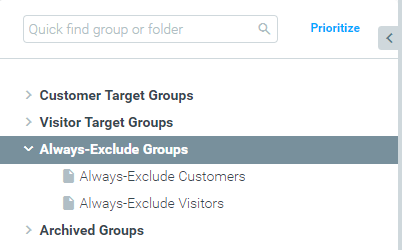
|| You can restrict editing of the Always-Exclude Target Group to admins only.
Contact your Customer Success Manager for more information.
Example Use Cases
Complete Target Group Overlap
Partial Target Group Overlap
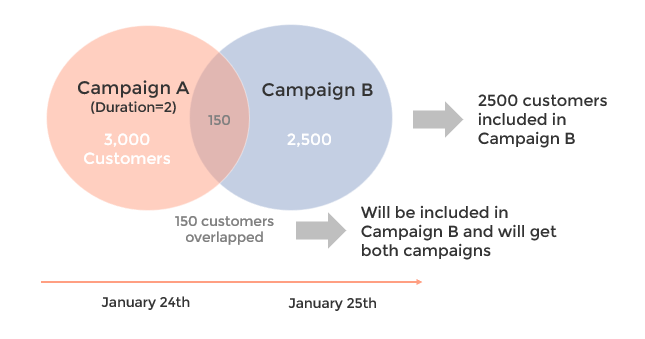
- Campaign A will not be affected by prioritization and exclusion rules, since it has already been sent with 3,000 customers, locked in for two days.
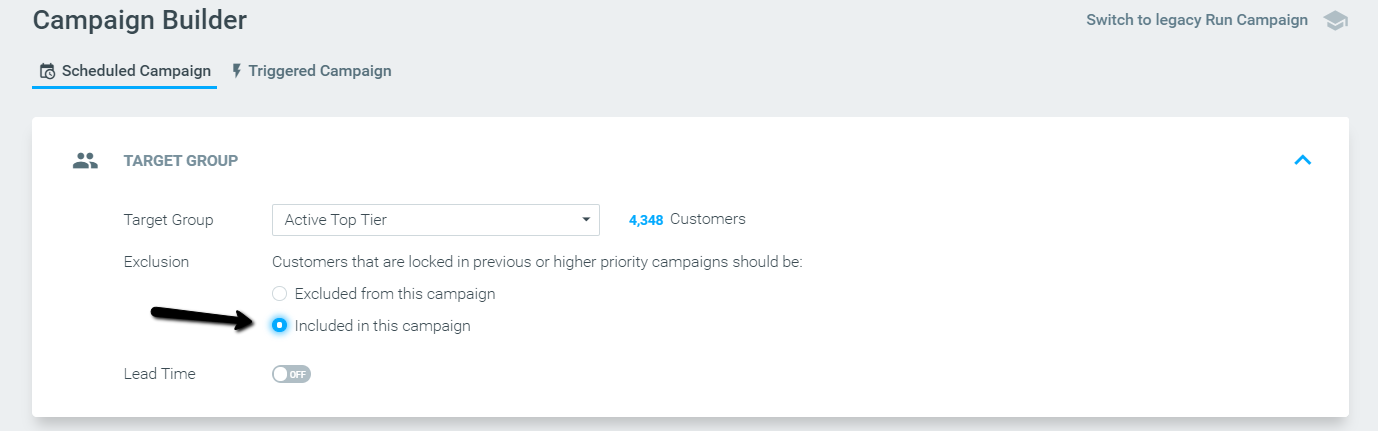
- Campaign B will be affected by prioritization and exclusion rules:– If in campaign B the “Excluded from this campaign” option is selected, the 150 overlapping customers will be excluded, and only 2350 customers will receive Campaign B (2,500 minus the 150 that overlap).
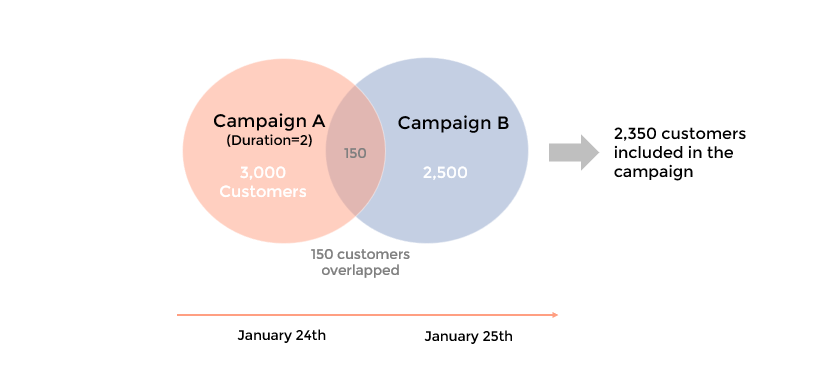 If in campaign B the “Included in this campaign” option is selected, all 2,500 customers in Campaign B will receive Campaign B. The 150 overlapping customers will receive both campaigns (A+B). Campaign A on January 24th, and Campaign B on January 25th.
“Exclude/Include per Channel” Example Use Cases
“Exclusion by Channel” With Other Campaigns' Priority Demonstration
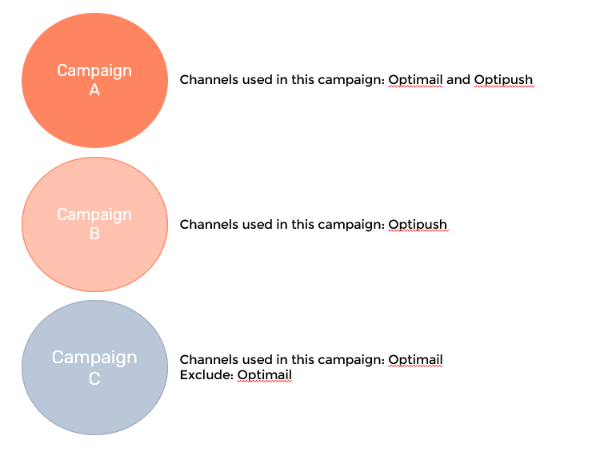
- Campaign A is prioritized above B and C.
- All three campaigns will be sent on the same day.
- Campaign A is a multi-channel campaign that will be sent out via the Email and Mobile Push channels.
- Campaign B is prioritized above C and will be sent out via the Mobile Push channel.
- Campaign C will be sent out via the Email channel, with a rule to exclude the channel Email only.
Assuming these are the only three campaigns customers are eligible for:
- Customers in the Target Group for campaign A will receive campaign A. Since this is the highest priority campaign, its inclusion/exclusion settings are irrelevant.
- Customers in the Target Group for campaign B will receive campaign B.
- Customers in the Target Group for campaign C who are not in the Target Group for campaign A will receive campaign C.
In other words, campaign C will exclude only customers who were locked in previous or higher priority campaigns that used Email as a channel (in this example, campaign A).
“Include by Channel” and Duration Demonstration
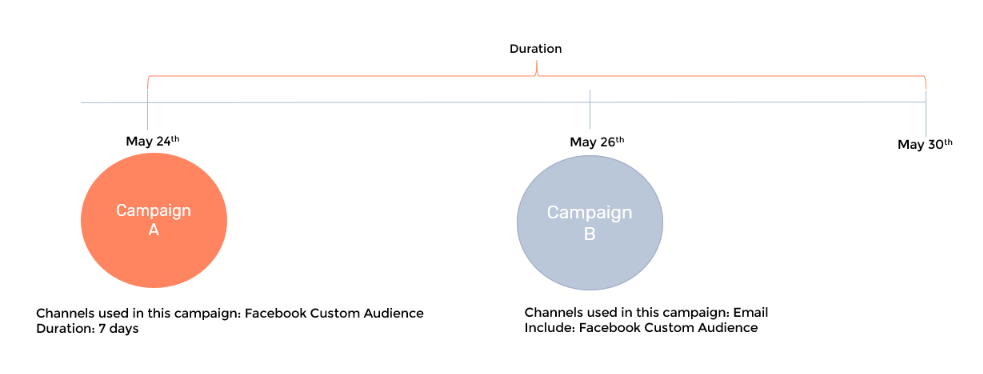
- Campaign A is scheduled for May 24th, via the Facebook Custom Audience channel, with a 7-day duration.
- Campaign B is scheduled for May 26th, via the Email channel, with a rule to include the channel Facebook Custom Audience.
In this case,
- Campaign B will include customers who were part of campaign A, even though campaign A has a 7-days Duration.
- Campaign B will target customers that are eligible for campaign B, as part of its Target Group.
In other words, campaign B will include both customers who are locked in higher priority campaigns for the Facebook Custom Audience channel (in this example, campaign A), as well as customers in its Target Group that are not in an overlapping Target Group/campaign.
"Include by Channel" and Control Group Demonstration
- Campaign A is scheduled for May 24th via the Facebook Custom Audience channel, with a 10% Control Group and a 7-day duration.
- Campaign B is scheduled for May 26th via the Email channel, with a rule to include the channel Facebook Custom Audience.
In this case, Campaign B includes all customers from Campaign A, both those who were added to the Facebook audience and those in Campaign A's Control Group.
If Campaign B instead used a rule to exclude Facebook Custom Audience, it would exclude all of Campaign A's customers, including the Control Group.