
The first step in setting up the AI Journey Decisioning Agent is creating a Target Group with an Auto Priority.
If you haven’t already read our introduction to priority management, start by reading about Manual Priority & Exclusions, and Auto Priority, and then continue reading this article.
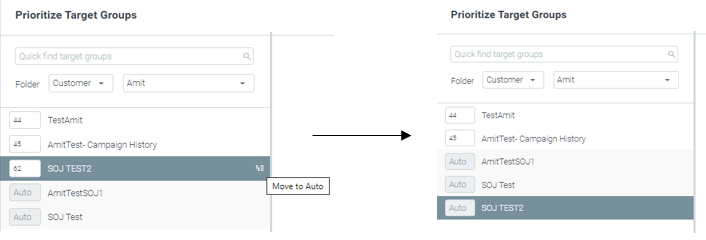
Choose a Target Group (or more than one) and click the Move to Auto button, which appears when you hover your mouse over a Target Group name. This changes the group’s priority from a manual number to an Auto.
Best Practices
When sending campaigns to Target Groups marked as automatic prioritization, customers eligible for several campaigns at a particular time will receive the marketing action with the highest predicted long-term impact for each particular customer.
Automated recurring campaigns can be a good fit for auto-prioritized Target Groups. However, in some cases, combining manual and automatic prioritization makes sense.
Below, we go through several cases and explain where you would want to use manual vs. Auto Priority and how to ensure your customers get the right campaign.
How to ensure your customers will receive only specific campaigns?
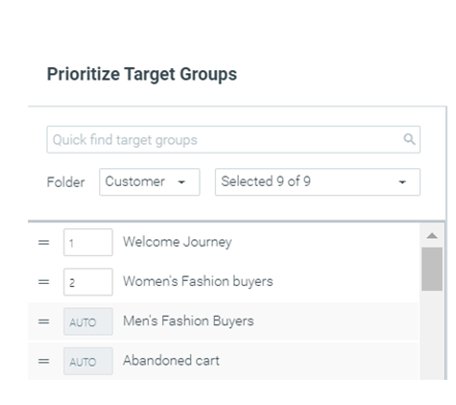
To make sure your customers will receive only specific campaigns, it is recommended to set these campaigns to manual priority and prioritize them above any other campaigns. Examples of cases in which you would want to use this prioritization tactic are:
- Specific flows where the sequence/order of emails is critical (e.g., a “welcome” flow).
- Business requirements and service interruptions (e.g., Version upgrade).
- Special one-time offers (e.g., specific promotions).
If you have selected the “exclude customers” option in all of your other campaigns, your customers will only receive the higher-prioritized campaign. For detailed examples, click here.
How do you ensure your customers receive more than one campaign daily?
In some cases, you might want to send customers an ad-hoc campaign in addition to your already scheduled campaigns. That means your customers will get both campaigns on the same day. For this, you must set both campaigns to Auto-Priority and select “Include customers” while building the ad-hoc campaign.
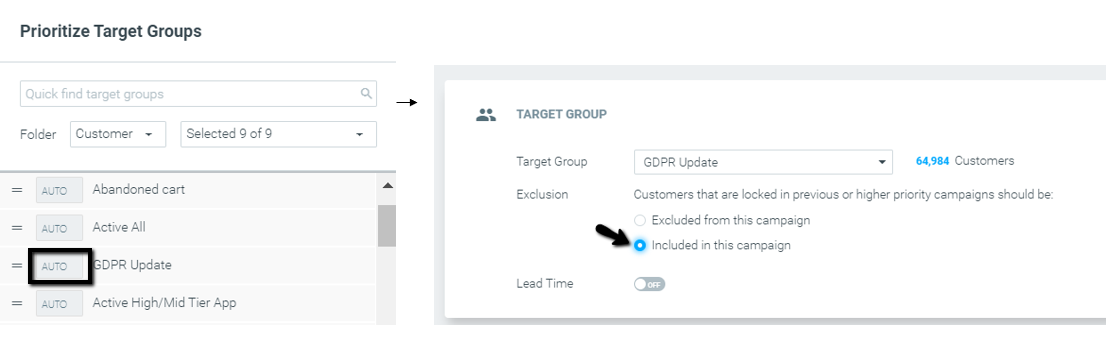
Examples of cases in which you would want to use this prioritization tactic are:
- New feature/product/game releases
- Important product updates (e.g., GDPR Update)
- Special one-time offers (e.g., specific promotions).
This way, customers will receive both the ad-hoc campaign and any other campaign they are eligible for during that specific day. For a detailed example, click here.
What is the recommended amount of manually prioritized Target Groups?
As a rule of thumb, you should use up to ten manual Target Groups as your magic number.
If you have more than ten groups, you should ask yourself the following questions:
- Can I prioritize between this Target Group and another, better than an optimization algorithm?
- Even if so, am I confident that this decision will still be relevant on a larger scale once I double or triple the number of active daily/weekly campaigns?
If your answer to any of the above questions is “No”, you should try to narrow down the number of manual-priority Target Groups in your marketing plan. Read more about Auto-Priority Target Groups here.