
This article provides answers to common questions about Auto Priority and the AI Journey Decisioning Agent.
Setting Up the AI Journey Decisioning Agent
What makes a campaign a part of your AI Journey Decisioning Agent?
A campaign is considered part of your AI Journey Decisioning Agent if you set its Target Group to Auto on the prioritization page, and the campaign is recurring. This means that all your auto-priority Target Groups compose your AI Journey Decisioning Agent , and thus the terms may be used interchangeably.
How does Optimove decide which campaign is optimal for each customer?
Every day, Optimove analyzes which customers are eligible for each campaign and evaluates each customer's future journey possibilities and potential gains stemming from the different journeys. By doing so, Optimove predicts the future value for each of the campaigns a customer is eligible for. Based on this calculation, Optimove determines which campaign would be the next-best-action for each customer.
What metric does the AI Journey Decisioning Agent use to optimize campaign decisions?
The AI Journey Decisioning Agent compares and prioritizes campaigns based on the expected value of your organization's main KPI. This ensures all campaigns are evaluated on a consistent, high-level metric that reflects what matters most to your business.
How does Auto Priority consider content preferences?
In addition to analyzing historical campaign performance and customer behavior, Auto Priority learns what types of content each customer responds to based on their past interactions. It identifies patterns in content tags (like promotion types, messaging styles, or communication channels) and uses those insights along with customer characteristics to select campaigns that match each customer's preferences and profile.
Does Auto Priority work for brand new campaigns with no performance history?
Yes. Auto Priority can score new campaigns immediately based on their content tags and how well they align with each customer's profile and preferences. This eliminates the traditional "cold start" problem where new campaigns need weeks of data before they can be optimized.
How does content intelligence improve campaign selection?
Content intelligence allows Auto Priority to personalize at a more granular level. Instead of just knowing "Campaign X performed well," the AI understands why it performed well (maybe it was the promotion type, the messaging tone, or the channel). This knowledge transfers to similar campaigns, improving selection accuracy across your entire campaign portfolio.
How long does it take to determine if a campaign has a higher impact on a customer's main KPI?
The time it takes to evaluate a campaign's impact depends on the Target Group size and sending volume. The more data collected from each campaign occurrence, the faster the AI Journey Decisioning Agent can gain insight into its effect on your customers' key performance indicators.
Allocating Customers Between Auto and Manually Prioritized Campaigns
What happens when customers overlap between auto-prioritized and manually prioritized campaigns?
By default, Optimove will always allocate customers to manually prioritized Target Groups first, and only then to auto-prioritized Target Groups. When creating campaigns, Optimove automatically excludes customers already included in other concurrent campaigns. If you’d like to involve customers in a Target Group, and as a result in a campaign, even though they may be engaged in other ongoing campaigns, select the “Included in this campaign” option when building your campaign. For example, consider the use cases mentioned in this article.
When creating a new campaign using an auto-prioritized Target Group, how will Optimove allocate customers to those campaigns until it gathers data on each one?
When a new campaign is launched with auto priority, Optimove distributes all eligible customers equally between overlapping campaigns until the AI model gathers enough data. Let's use an example to demonstrate. Imagine a group of customers are eligible for three auto-prioritized campaigns. One is a new campaign, and the rest were already auto-prioritized and running. 33% of the customers will be allocated to the new campaign, and the other 66% will be split between the two other campaigns according to the algorithm's ability to determine which one has a higher future value for each customer.
Does customer allocation work in the same way for ad-hoc and recurring campaigns?
Yes, with slight differences. In most cases, ad-hoc campaigns do not have historical data, and therefore, Optimove will treat them as 'new' campaigns (which gives them an equal allocation). For example, if there is a conflict between three campaigns: two existing campaigns with historical data and one new campaign, 33% of customers who are eligible for all three campaigns will receive the new campaign. In comparison, the rest will be allocated to the additional two campaigns based on the campaigns' potential impact on each customer.
How does customer allocation work for non-converting customers who registered yesterday?
The optimization process is based on a comparison of similar customers. Therefore, it works just the same for new customers as for every other group. The AI Journey Decisioning Agent algorithm looks at the Future Value of similar customers who received the potential campaigns and, based on that, projects the Future Value for these new customers.
Managing the AI Journey Decisioning Agent
How do the AI Journey Decisioning Agent work with exclusion and inclusion rules on a campaign level?
When a campaign is set to "include," it will always be sent to your customers. Therefore, even if your Target Group was set to auto-priority, when setting a campaign to use the "include" option, it will always be sent to your customers.
When a campaign is set to "exclude," it will only be sent to customers who are not locked into previous or higher-priority campaigns. In this case, "higher priority" can be either manual campaigns or those determined as a higher priority by the AI Journey Decisioning Agent algorithm.
For further reading, check out the example use cases section:
How can I ensure that an ad-hoc campaign is sent to all customers, in addition to my weekly marketing campaigns?
To ensure the ad-hoc campaign is sent to all customers, when creating the campaign in the Campaign Builder, make sure to check the "Included in this campaign" option. Doing so ensures your campaign will be sent to all of the Target Group's customers, regardless of additional campaigns and prioritization. This means the campaign's Target Group priority can be set to either Manual or Auto.
Is there any point in setting the Target Group used in ad hoc campaigns to auto-priority?
No. Campaigns must be recurring so that learning and adjustments can be made. However, nothing will happen if the Target Group are left as auto-priority.
What is the impact of control groups on the AI Journey Decisioning Agent algorithm?
Control groups have no impact on the AI Journey Decisioning Agent algorithm. The AI Journey Decisioning Agent algorithm considers the customer's Future Value (impacted by the average KPI a customer generated). The algorithm does not take into account campaign uplift, which is calculated by the usage of control groups. For that reason, the AI Journey Decisioning Agent do not rely on control groups for optimization and will not be affected if you are not using control groups. That said, we recommend adding a control group to all of your campaigns. Read why here.
Which campaign will be sent out in a scenario where a customer has scheduled and triggered campaigns, but the Target Group is set to auto-priority?
There is no difference between scheduled and triggered campaigns in terms of priority management. Customers will be allocated to campaigns (scheduled or triggered) based on the priority determined by the AI Journey Decisioning Agent algorithm. Please note that the priority of triggered campaigns is determined based on the Target Group's relative priority. For more, please see this article.
Are there any consequences if I change from manual to auto priority (or vice versa) on a Target Group that has a recurring campaign scheduled?
No. The changes will be reflected on the next day.
Will using the same Action in different AI Journey Decisioning Agent campaigns influence results?
No. You can reuse actions without worrying about how they will influence your campaign's results. Actions are used on the campaign level – that means that if you decide to use the same action in several campaigns (either auto-prioritized or manual), we will treat each action separately.
Are action types also taken into account?
No.
Does campaign duration have any influence on the likelihood that Optimove will choose to deliver the campaign over other campaigns?
The longer the campaign duration is, the higher the chance of a response. However, while campaign duration does have an impact on response rate, Optimove normalizes campaign results to account for this duration. Therefore, by normalizing results and comparing apples to apples, the AI Journey Decisioning Agent avoid favoring campaigns with higher duration.
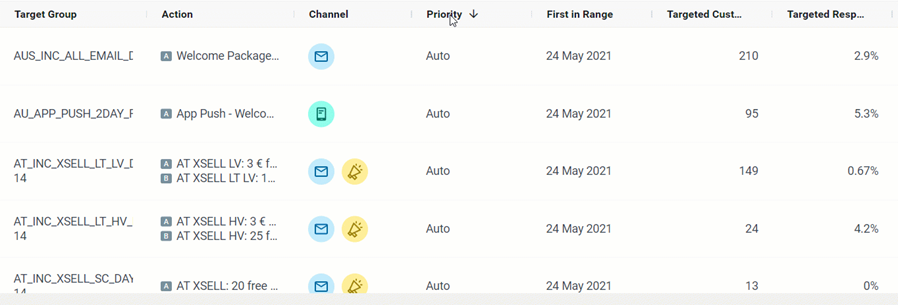
Is there an indicator in the Mission Control to differentiate between manual priority and auto priority campaigns?
Yes. This indicator is available in Mission Control, under the Priority column.
Can a CSV campaign be auto-prioritized?
No. It can't.