
Priority and exclusions for triggered and scheduled campaigns are managed separately. That means that the prioritization and exclusion mechanisms of triggered campaigns do not impact those of scheduled campaigns, and vice-versa.

Priority
As part of the batch data process, customers eligible for triggered campaigns are allocated to target groups that have active triggers in them. The priority of triggered campaigns is determined based on the target group’s relative priority.
Please note that if, after the batch data process, an active trigger is set on a target group that does not have any other active triggers for that specific day and until the batch data process of the following day is completed, only customers who were not already locked into another group will be allocated to it, regardless of this target group’s relative priority.
Learn more about how the batch data process influences Triggered Campaigns here.
Example Use Cases
Executing Only Triggered Campaigns
Target Group with Multiple Triggers
In this example scenario, target group A was set up with more than one triggered campaign:
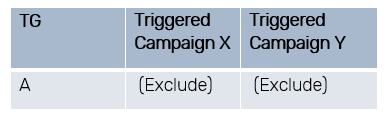
What campaigns will customers receive?
- Customers who trigger both triggers will receive both campaigns. Customers who trigger only one of the triggers will receive only that campaign.
- There is no way to determine the priority between campaigns within a target group.
Target Group with Single Triggers
In this example scenario, target groups A and B were set up with one triggered campaign each:
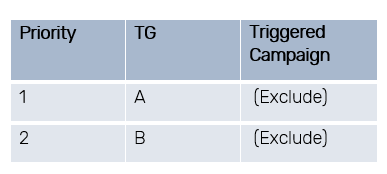
What campaigns will customers receive?
Customers overlapping between target groups will only receive the triggered campaign associated with the higher-priority target group (in this case, target group A).
Combining Triggered and Scheduled Campaigns
Target Group with Both a Triggered and Scheduled Campaign
In this example scenario, a scheduled campaign and a triggered campaign were set up for target group A.
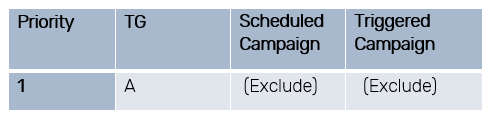
Customers will receive both the Scheduled and the Triggered Campaign because priority and exclusions are managed separately.
Target Groups with Complex Settings
In this example scenario:
- Triggered Campaigns were set up for target groups A and C, with exclude set by default.
- Scheduled Campaigns were set up for target groups B and C. The scheduled campaign for target group B has the “Exclude” option selected, while the scheduled campaign for target group C has the “Include” option selected. As a reminder, all triggered campaigns have the “Exclude” option selected by default.
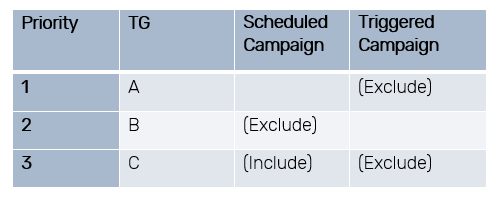
- A customer who answers the criteria for all target groups will receive only one triggered campaign (associated with target group A) since target group A is in higher priority, and exclusion is set by default.
- In addition, this customer will receive both scheduled campaigns (associated with target groups B and C) because C is prioritized below B and includes customers that are locked in previous or higher priority campaigns.
- To sum up, the customer will receive a total of 3 campaigns on that day. Triggered campaign A, scheduled campaign B and scheduled campaign C.