
By definition, every campaign executed through Optimove has a duration. This refers to the number of days that your campaign is considered to be in effect. During this period:
- Optimove will exclude customers included in this campaign from all campaigns of lower priority that has the “Excluded from this campaign” checkbox checked.
- Optimove will track the activity (purchases, deposits, bets, etc.) of the targeted customers and will attribute this activity to the marketing campaign that was sent.
What is the impact of Campaign Duration on customer exclusions?
Since the activity of your targeted customers is measured during this period, and the success of your campaign will ultimately be judged by their behavior in this timeframe, it is essential to exclude these customers from receiving any additional campaigns for as long as the duration of the campaign is set.
To do so, you must choose the “Excluded from this campaign” option in as many campaigns as possible.
This approach provides you with two important benefits:
- Duration and exclusion ensure that there is no measurement ambiguity in your campaign results. If customers receive two campaigns during the same time period, it becomes difficult to identify which campaign actually prompted them to take action. Even if promotional codes or other identifiers are used to track which campaign brought customers to the website, can we necessarily be certain that the same campaign actually triggered the action?
- They also ensure that your customers are not being spammed with multiple campaigns at any given time, preventing ‘brand fatigue’ and the dilution of your offers.
As mentioned above, once a campaign is in duration Optimove will attribute the activity of the targeted customers to the actual campaign, since those customers should not have received additional campaigns during this timeframe.
To read more on defining prioritizations and exclusions between multiple campaigns in Optimove, please click here.
Defining a campaign’s duration in Optimove
When creating a new campaign or editing an existing one, you can set or update the campaign’s duration.
|| Note that upon first opening the scheduling section of the Campaign Builder, your campaign’s duration is set to your Optimove’s instance default. You can manually override that number for each individual campaign in the “Scheduling” section of the Campaign Builder. In order to change your default duration, contact your CSM.
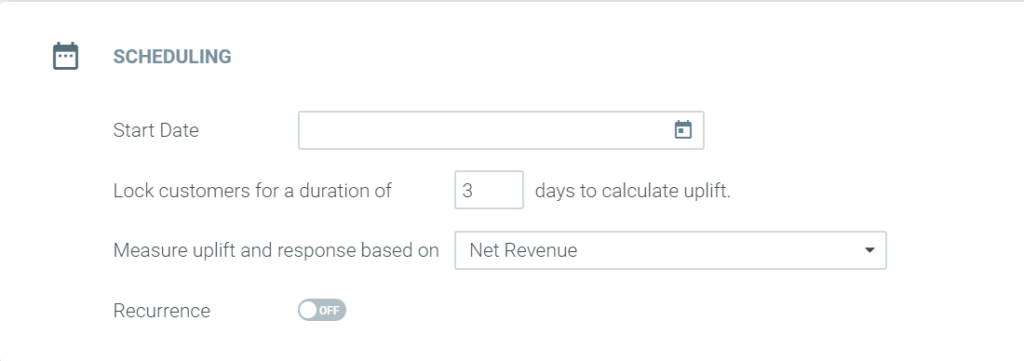
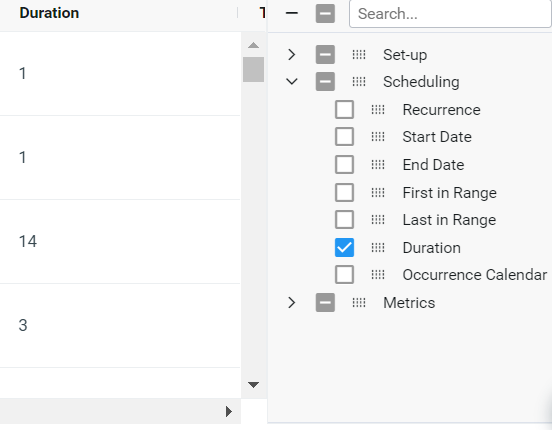
Once a campaign has been scheduled, its duration can easily be viewed when monitoring your campaigns in Mission Control.
This can be done in two ways:
1. Go to the columns pane, and under Scheduling select the Duration column
2. Click the three dots to the left of your campaign, and select campaign details. Under scheduling, you can see the campaign duration.
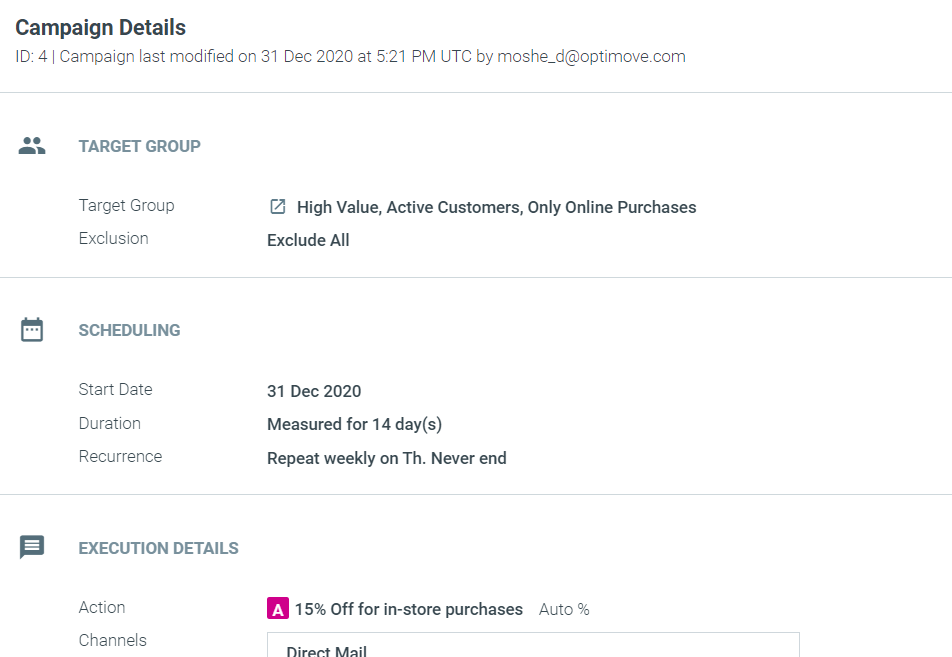
|| Note that each occurrence will also note the date when the duration is set to end.
Deciding your campaign’s duration
This is a question of balance.
On one hand, the duration should not be too long since it excludes customers from receiving additional campaigns which could contribute valuable revenue for the business.
On the other hand, the duration should be long enough for the targeted customers to respond to the campaign and allow the campaign analysis to pick up on the activity.
The most straightforward situation is when a certain timeframe is defined for the customers within the campaign. For example: ‘10% off Sitewide for the next 3 days’. The obvious duration for this campaign would be 3 days since this was the period specified for customers to take advantage of the offer and only these 3 days should be tracked and the activity attributed to the campaign.
When campaigns don’t specify a timeframe for action, you should note the average visibility time that customers have for a campaign. If customers are receiving campaigns via email, in most cases the campaign will get lost in their inboxes after a few days and will probably not resurface. It is therefore essential to consider how long you expect it should take for customers to make a corresponding action (purchase, deposit, bet, etc.).
Campaigns with a one-day duration can be used when you don’t require extensive tracking or for campaigns that are not expected to bring about a change in customer behavior. For example welcome campaigns, reminder campaigns, follow-ups for gamified campaigns (such as an email notifying customers that they have been credited with $10 as a result of an action they made), Churn customers who reactivated and should enter the Reactivated journey, etc.