
Streams
Optimove’s new Streams capability allows you to easily test different marketing strategies and compare them, to determine which campaign strategies are better for growing your business over time. Instead of simply analyzing an individual recurring campaign, Streams lets you test how a series (a “stream”) of multiple campaigns perform together, in comparison to alternative multiple-campaign streams or a static control group.
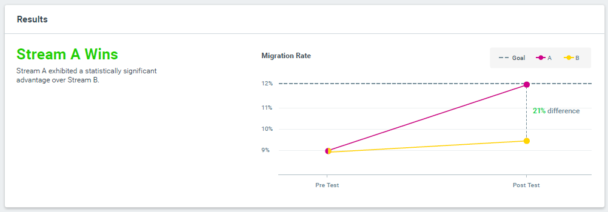
1: Lifecycle Stage Migration Objective
2: KPI Improvement for a Particular Target Group
Choose this objective type when your goal is to determine which stream is most effective at maximizing a specific KPI for a particular target group of customers (e.g., which stream generates a higher order value for jewelry shoppers in the Nordic countries).
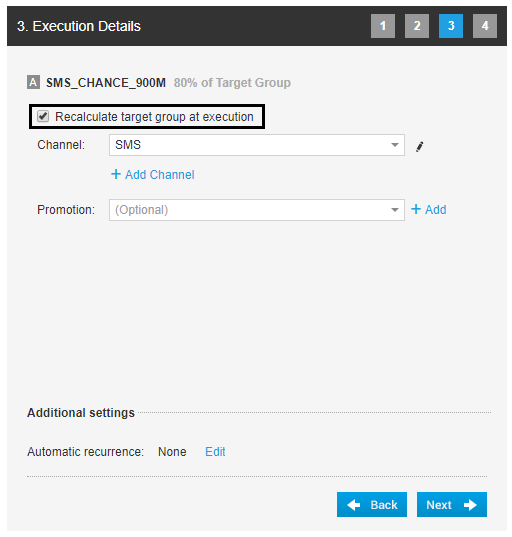
Recalculate Target Group at Execution
Optimove now offers a campaign option to recalculate a target group (i.e., to determine which customers meet the group’s selection criteria) at the last possible moment, right before a campaign is executed for this group. If very recent customer activity occurred – and was reported to Optimove – since the list of customers in this group was calculated (usually, earlier in the day, during the Optimove daily process), then the group will be updated to reflect the latest activity.
- Customer Attributes– Updates to customer attributes can be made using the new API call, UpdateCustomerAttributes. The target group will be recalculated to reflect the latest customer attribute values.
- Web & App Activity– Tracked website and app events captured by Track & Trigger are updated in the customer database on an hourly basis. The target group will be recalculated to reflect the latest recorded customer activity.
|| Note: New customers who were not a part of the original target group will NOT be added as part of the recalculation process.
Updates to the OptiMail Visual Editor
The OptiMail Visual Editor, Optimove’s internal drag-and-drop email template editor, now includes the following new functionality:
- Improved support for Unsubscribe templates – Multiple versions of unsubscribe texts and links can now be configured in advance, and are then available from a dropdown list in the Visual Editor. This offers a more convenient way to insert unsubscribe links in your templates.
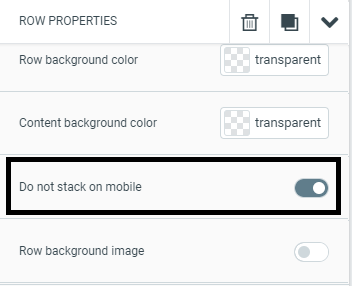
- Stacking images on mobile screens – You can now turn the stacking of images on or off when viewing your template on mobile devices. Stacking images can be configured separately per template row, in the Rows properties section:
Changing Campaign Metrics for Recurring Campaigns
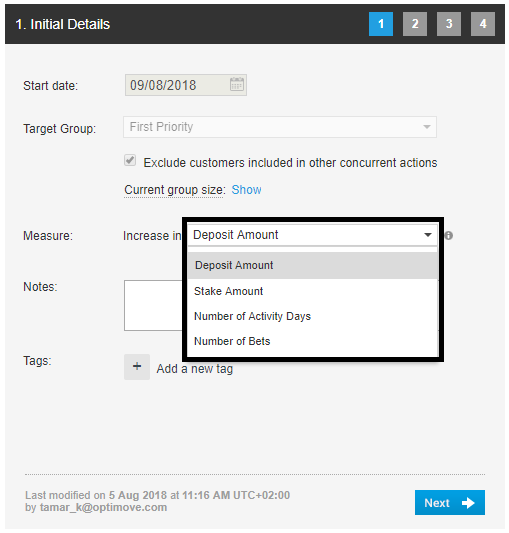
You can now change the selected metric for recurring campaigns, even after the series has begun running. This means that, during the execution period of a campaign series, you can alter the default measurement metric for all future instances.
|| Note that this functionality is not available for Self-Optimizing Campaigns, as their pre-configured measurement metric is used for all optimization calculations and cannot be modified mid-series.
Adding Optimail Templates via API
Optimail users can now use the Optimove API to add new email templates from any external source, or to update existing templates, for all their managed brands. This includes the template’s HTML, personalization tags, subject line, from-email-address, and more. See the new Optimail Functions section of the API Guide for details.
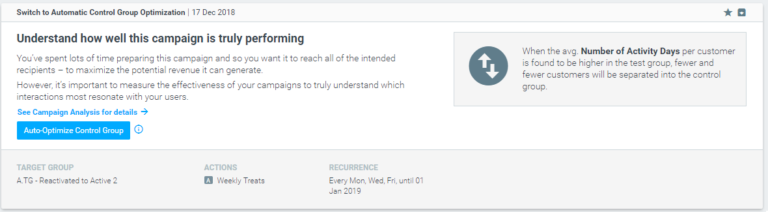
New Optibot Insight – Switch to Automatic Control Group Optimization
Optibot can now identify campaigns where a static test/control allocation is defined and may recommend switching to an optimized test/control allocation, updated automatically with each run of the campaign. Using automatic control group optimization will help you run a smarter experiment, and better understand how well the campaign is performing.
Criteo Integration
Criteo is an advanced retargeting service used by retailers to serve personalized online display advertisements to consumers who have previously visited an advertiser’s website.