In this article, you will learn how to access capabilities previously found in the Marketing Plan.
If you haven't yet got the chance to explore Mission Control, read
here to learn how to leverage Mission Control to monitor, analyze, and strategize your campaigns all in one place.
Campaign Monitoring
How do I create a calendar view?
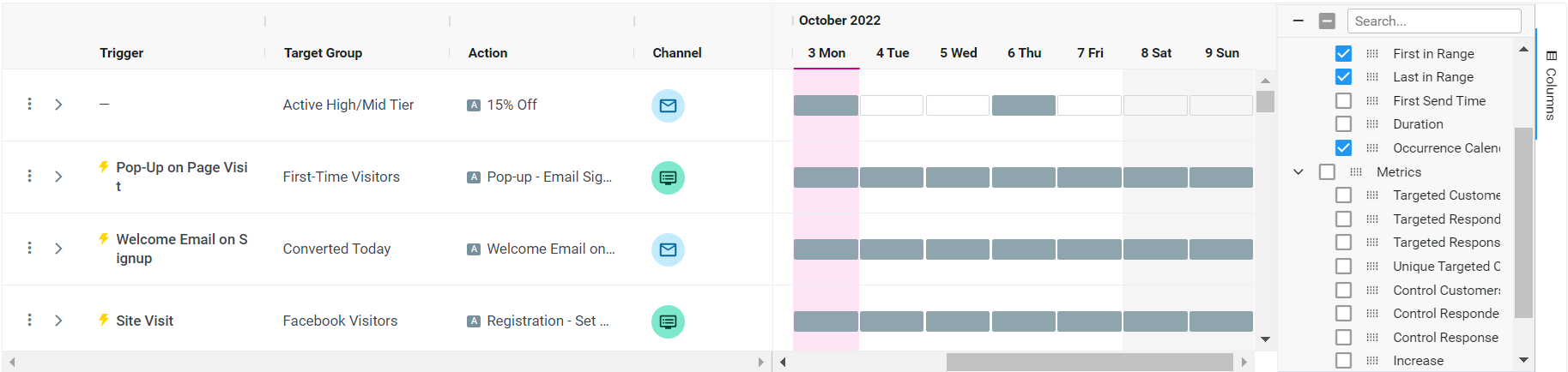
To create a calendar view of your campaigns using the Occurrences Calendar.
Follow the steps below to do so:
1. Click on the Columns panel
2. Add any desired column, such as Priority, Target Group, and First in Range
4. Under the Scheduling section, add the Occurrences Calendar
5. Save as New View, and label as Calendar View
How do I view the details of a multi-template campaign?
Using multi-template campaigns in Optimove, you can send different campaign templates to your customers without having to create separate campaigns for each template.
In order to view the conditions you have set for each template, follow these steps:
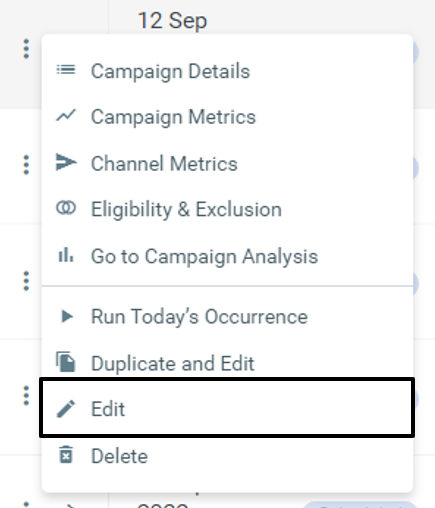
- Select a campaign with multiple templates, and click on the three dots on the left
- Select "Edit" and you will be redirected to the Campaign Builder
- Your templates conditions will be visible within the Execution Details
How do I see how many customers will receive a future campaign?
Although there is no column to view the estimated target group size, you can find out how many customers will receive a future campaign by following these steps:
- Select the date range the future campaign will be executed
- Choose a campaign and click on the three dots on the left
- Select "Campaign Details"
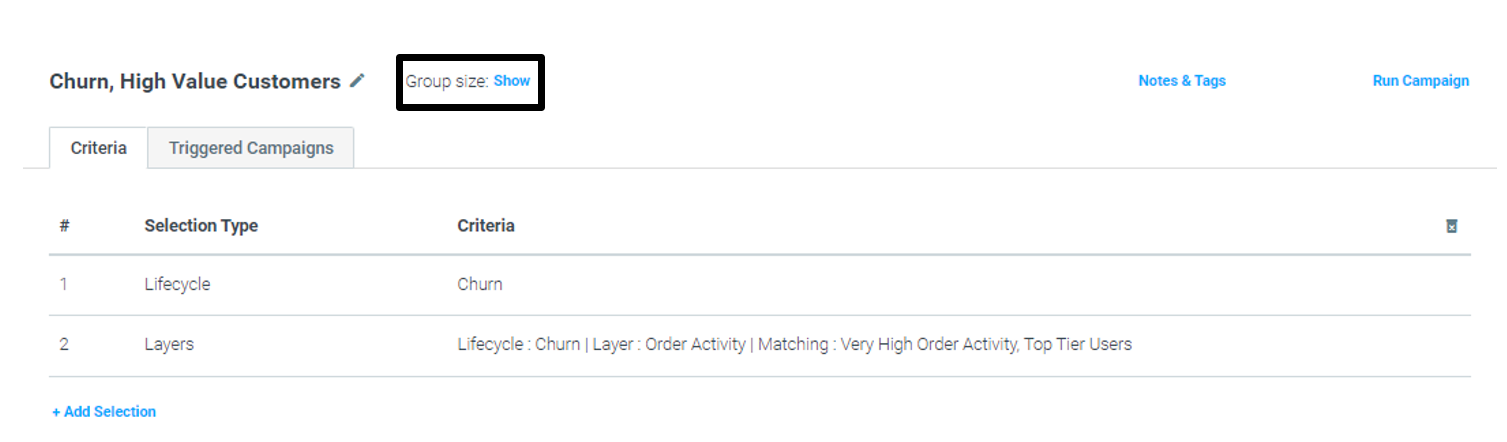
- Click on the link next to Target Group and you will be redirected to the Manage Target Groups page
- Next to Group Size click "Show"
Why does the overall status in Mission Control show 'Running' for a future series of scheduled campaigns, while the campaign series dropdown displays 'Scheduled'?
The main grid's status reflects today's occurrence. Since the date range you selected does not include today's date, the occurrences table shows the status of each occurrence within the specified range, which may differ from the current status of today's occurrence.
Does the 'current status' in Mission Control always reflect the status of the most recent run of a recurring campaign, even if the selected date range does not include the most recent date?
If a Target Group is archived, will it still appear in Mission Control?
No, an archived Target Group will not appear in Mission Control. Mission Control only displays TGs that have been used in campaigns during the selected timeframe, and archived TGs are excluded because they haven't been active for a while.
Campaign Editing
How do I duplicate campaign?
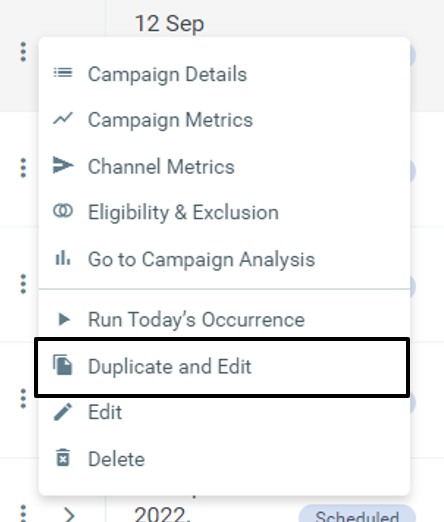
You can duplicate campaigns using the Duplicate and Edit function.
- Select the campaign you want to duplicate, and click on the three dots on the left
- Click on "Duplicate and Edit" and you will be redirected to the Campaign Builder
- Click on "Create Campaign" in the Campaign Builder
How do I delete future occurrences of a campaign?
You are able to delete future occurrences of a campaign from a specific date in Mission Control by following these steps:
- Select a campaign you want to delete and click on the three dots on the left
- Click "Edit" and you will be redirected to the Campaign Builder
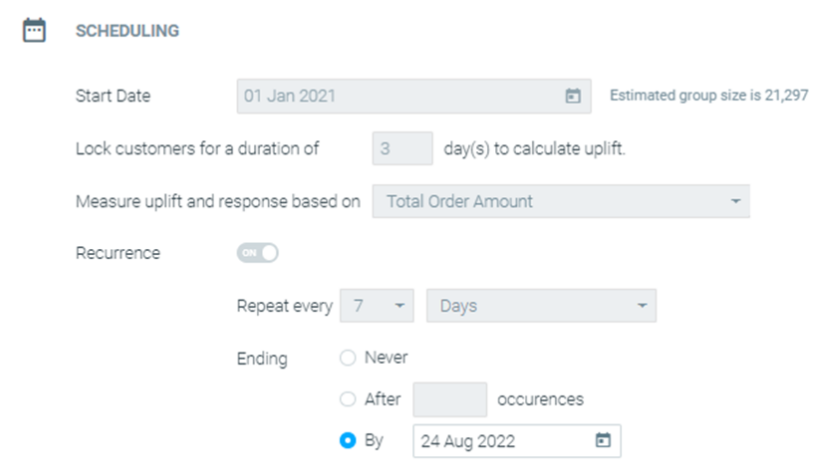
- Click on the Scheduling section
- In Ending, go to "By" and select the date you want to end the campaign
- Click on "Update Campaign"
Read here to learn more about deleting scheduled campaigns.
Campaign Execution
If I set a campaign with "send by local time zone" and then force run it from Mission Control, will it be sent by local time zone or to all users at the same time?
The campaign will be sent according to the local time zone. If, at the moment of the force run, the local time has already passed for some users, the campaign will be sent to those users immediately.
Campaign Analysis
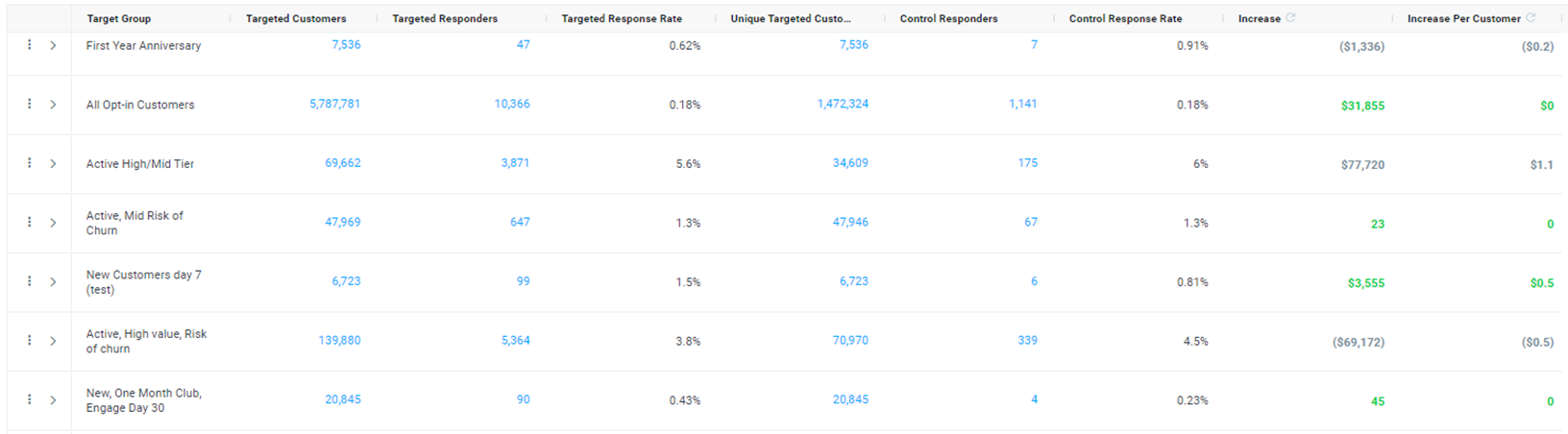
How do I measure Target Group Performance?
You can easily measure and compare target groups by adding the following columns:
- Targeted Response Rate
- Unique Targeted Customers
- Control Customers
- Control Response Rate
- Increase
- Increase Per Customer
Follow these steps to do so:
- Filter by the relevant date range and Target Groups
- Choose the desired campaign KPI
- Click "Show All Increase"
- Save the view
How do I compare Target Groups?
By exporting your data from Mission Control, you can analyze your target groups by comparing response rates with the steps below:
1. In the Mission Control dashboard, export the data using "Export with occurrences"
2. Summarize the Targeted Responders, Control Responders, Targeted Customers, and Control Customers for all the campaigns of every target group
3. Divide the Targeted Responders by Targeted Customers to get the targeted response rate
4. Divide the Control Responders by Control Customers to get the control response rate
Why might one campaign KPI be statistically credible while another is not?
When using different campaign KPIs, such as Transaction Amount or Product Margin Amount, it’s possible that one KPI might be statistically credible while the other is not. This is because each KPI has a different average value, and the "Increase In" metric needs to meet a specific threshold to be considered statistically credible.
Why is the "Increase In" metric different when viewed at the occurrence level, series level, or aggregate level in Mission Control?
The "Increase In" metric varies across the occurrence, series, and aggregate levels in Mission Control due to its nuanced calculation. Since this metric is based on averages rather than additive values, it can differ depending on the level at which it is viewed. Each level provides a distinct perspective on the data, leading to variations in the "Increase In" figures.
What could cause customer coverage to differ between the Mission Control Dashboard and the Marketing Plan Explorer?
In the Marketing Plan Explorer, customer coverage only accounts for those targeted by scheduled campaigns, while in Mission Control, it also includes customers targeted by triggered campaigns.
I'm using the "export with occurrences" option and notice that fields for occurrences marked as "No Customers" are empty. Is this expected?
Yes, this is expected behavior. We intentionally leave the "Targeted/Control customers" fields empty for occurrences with a status of "No Customers" to maintain consistency with the Mission Control table. Since a value of 0 could be a legitimate result, leaving these fields empty helps avoid any potential confusion.
If I have Mission Control open in another tab with a Target Group selected, and then I open a stream and select “View in Mission Control,” why does the new tab for that stream include the Target Group selections from the other tab?
Mission Control retains your latest view to preserve your previous selections. To view all campaigns in a stream without applying prior filters, simply add the stream filter to your current view.
Are the templates in a campaign listed in alphabetical order in Mission Control?
Yes, the templates are always listed in alphabetical order.
How is the ‘Number of Campaigns by Channel’ in the Mission Control Dashboard calculated?
It is calculated by counting the number of occurrences running within the same channel.
How often are OptiMail metrics updated in Mission Control?
The metrics are updated in real-time. We recommend manually refreshing Mission Control to view the latest data, as it fetches updated information each time you refresh.
Why might the sum of the individual weekly calculations for Uplift be smaller than the monthly calculation?
The sum of the individual weekly calculations might be smaller than the monthly calculation because we don't simply aggregate the increases from each week. Instead, we use "series analysis," which calculates the uplift for the entire series of campaigns as a whole. This method can result in differences between the sum of the weekly calculations and the overall monthly total.
When selecting a specific date range and target groups, should the total increase in the KPI be the sum of all the statistically significant numbers (green) for each target group?
No, the total increase in the KPI is not simply the sum of the statistically significant (green) numbers for each target group. Instead, we recalculate the uplift across all campaigns within the selected view to provide a more accurate measure of the overall KPI increase.
Is there a way for Mission Control to find a campaign using the "Campaign ID" or "Campaign Occurrence ID"?
You can only filter campaigns at the series level, but if you export data from Mission Control, you will get the occurrence ID included.
What could be the reason for seeing higher click rates than open rates?
This can occur in campaigns where multiple clicks are recorded per recipient, which can result in a click rate that exceeds 100%.
Are opens and clicks in Mission Control related to the template or the analysis range?
In a scenario where you have two email campaigns scheduled sequentially—one for today at 9 PM and the next for tomorrow at 7 PM—setting a 'wait until -1 day' will not make the system wait a full 24 hours before sending the next campaign. Instead, the 'wait until -1 day' function operates on a per-calendar-day basis, meaning the second campaign will be sent on the next calendar day, even though only 10 hours have passed.