
It is often very valuable to base the personalization of player marketing on the particular games, or game categories, that customers have played in the past. Targeting bonuses cross-sell offers and other incentives based on historical gameplay patterns has proven itself as a powerful way to increase customer engagement and loyalty.
You can use this approach in Optimove by defining Target Groups using the Game Play History selection category. The selection criteria in this category consist of three elements:
|
Selection Element
|
Examples
|
|---|---|
|
Type of history
|
|
|
Game/product, game category, or type of game
|
|
|
Time frame
|
|
Additional Timeframes
When using "any campaign", the only available timeframe is "during the previous" X days. When using the additional activity options ("while a member of a target group" or "One or more actions"), the available timeframes are:
- During the previous / exactly (number of days) ago - customers who were targeted over the past X number of days or exactly X number of days ago.
- This week (to date) – customers who were targeted during the week (Mon-Sunday). For example, if today is Wednesday, this timeframe will include Monday and Tuesday’s customers.
- This month (to date) - customers who were targeted during this month.
- This quarter (to date) - customers who were targeted during the current quarter.
- This year (to date) - customers who were targeted during this year.
- Last calendar week – customers who were targeted last week. For example, if today is Tuesday, August 29th, "last week" would be Monday the 16th – Sunday the 22nd.
- Last calendar month - customers who were targeted last month.
- Last calendar quarter - customers who were targeted during the previous quarter.
- Last calendar year - customers who were targeted during last year.
- On this date - customers who were targeted on a specific date.
- In this date range - customers who were targeted on a specific date range.
Selecting customers who played
To select players who played follow the steps below:
- Go to Game History in the Selection Criteria navigation bar.
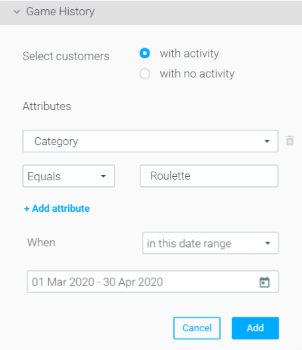
- Select customers “with activity.”
- Use the Attributes, Condition, and Value fields to select the game/product, game category, or type of game you want to use to segment your customers. For example, Category equals Roulette.
- Define the timeline for which the conditions should be met. For example, between March 1st and April 30th.
- You should now have criteria set up similar to the one below. All that is left is to click “Add.”
Selecting customers who did not play
To select players who didn’t play follow the steps below:
- Go to Game History in the Selection Criteria navigation bar.
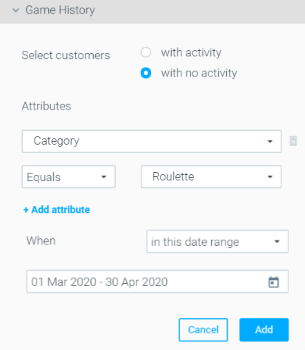
- Select customers “with no activity.”
- Use the Attributes, Condition, and Value fields to select the game/product, game category, or type of game you want to use to segment your customers. For example, Category equals Roulette.
- Define the timeline for which the conditions should be met. For example, between March 1st and April 30th.
- You should now have criteria set up similar to the one below. All that is left is to click “Add.”
Example Use Cases
New Game Launch Campaign
To promote a new roulette game, the marketer wants to send a generous bonus offer to all players who wagered more than $1,500 on any roulette games during the past three months:
Alternatively, the marketer can target active players who did not play a particular game, or according to particular conditions. In this example, the marketer is targeting all players who did not play roulette at all during the past 90 days, so that he can offer them a bonus, for cross-selling purposes. (In this case, this criterion would be combined with a second criterion that selects players who did play any games during this period).
Off-season Cross-sale Campaign
Marketers at sports betting sites want to entice their football bettors to bet on tennis during the football off-season. They used Optimove to combine their “Football Fans” customer segment with a Game Play History selection of those customers who made at least one bet on Tennis during the past 90 days.
Game/Product History Update Frequency
Game/Product History updates daily. Read more about the update frequency here.