As your CRM strategy expands and the number of campaigns grows, it becomes more and more important to show exactly how much your campaigns contribute to the company's bottom line.
However, showing your contribution varies depending on the type of campaigns you’re running and their objectives. Your strategy may include:
- Ad-hoc campaigns with non-recurring customers
- Recurring campaigns with non-recurring customers
- Recurring campaigns that may have some recurring customers as well
In some cases, the impact may be limited to the offer or campaign, making it worthwhile to measure an immediate effect.
At other times, it should be measured as a compounded impact, and sometimes you may want to measure both the immediate and the compounded impact.
Whenever you launch a campaign, you should always keep in mind how you would be able to see (and report) the results. That means that one of the steps to creating your campaign should be choosing your measurement method.
To do so, you first need to ask -Should the campaign drive an immediate response or nurture a response over time? The answer to this will define the measurement type you should choose.
Note: You should also always take into account campaign duration when designing your test – read more about Duration
here
So, how do you know which measurement method is right for your strategy and how you can implement it in Optimove? Well, that’s what we’re here for.
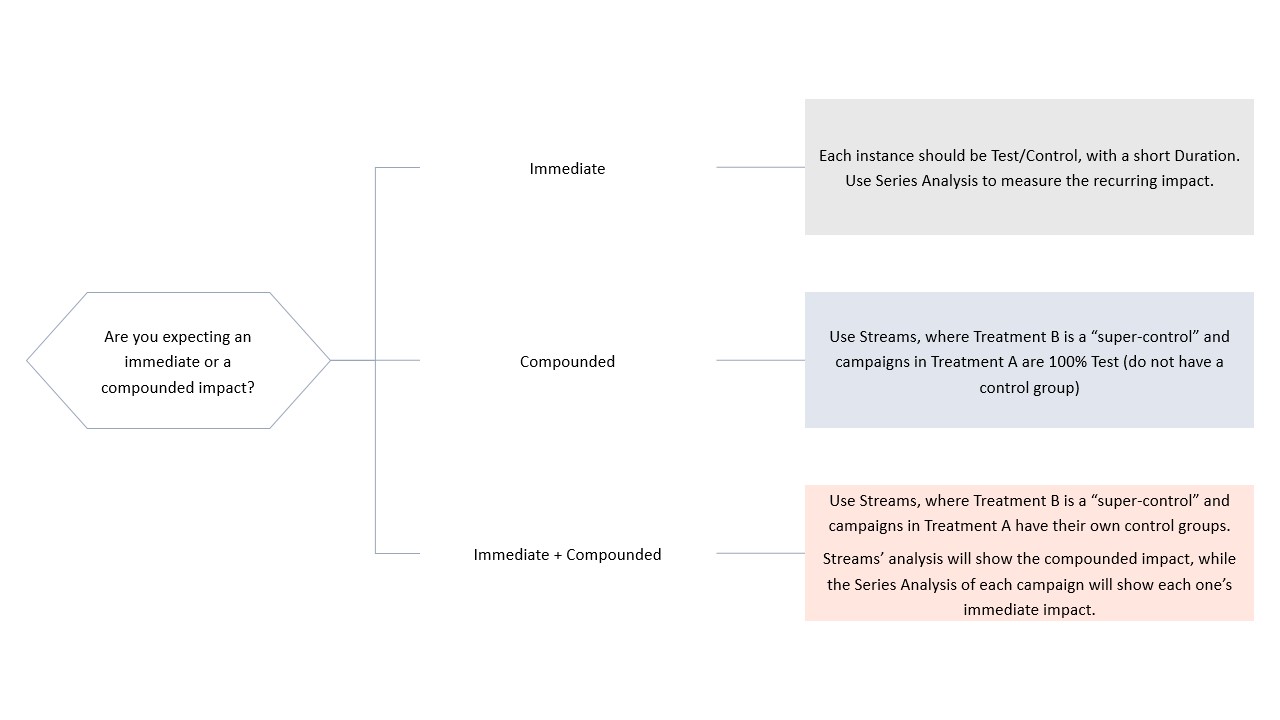
Immediate Impact - The Simple Test/Control Measure
If you wish to send an ad hoc campaign that prompts an immediate response from your customers, then you should opt for a simple Test/Control measurement.
Set up a campaign with a control and test group and send out your campaign.
The result is that every single customer in the test group has a corresponding customer in the control group.
This setup will allow you to scientifically measure the immediate incremental impact of your campaign on any one of your KPIs. More about control groups can be found
here.
Immediate response campaigns might include:
- Abandoned cart reminders
- Time-sensitive incentives for a new deposit
- Limited-time coupon for sale
For example, when sending out an abandoned cart reminder, you’d expect the customer to return and complete the purchase within a given timeframe after receiving your campaign. Let’s imagine it is 24 hours.
In this case, you would create a Test/Control campaign with a
Duration of 1 day.
On the
Campaign Analysis page, you can see how many customers who received the campaign made a purchase within 24 hours and compare their performance to that of customers in your control group, who did not receive the campaign. If you have a statistically credible (green)
uplift, then your campaign has an immediate impact on customer behavior.
Immediate & Compounded Impact - Series Analyses
What happens when you have a recurring campaign where each occurrence should drive immediate impact, but you also want to measure the incremental impact of all occurrences together?
The campaign could take place multiple times, and you’d probably want to know how each one worked.
However, it would be beneficial also to know how many transactions these campaigns generated over a specific time period. Let’s say, over a month, a quarter, and more.
Set up a recurring campaign with a control group and use Optimove’s
Series Analysis to view the total impact. You can even
exclude outliers to improve reporting strength.
Campaigns that fit this type of measurement include:
- A weekly promotional roundup where you’d want to know if running the weekly roundup is driving more transactions.
- Responsible gaming practices
- A new collection drop announcement
For example, in a weekly promotional roundup, you’d expect the customer to visit your site following every send. Ideally, that customer would also complete a purchase within a given timeframe after receiving the campaign. Let’s imagine it is in 48 hours.
In this case, you would create a Test/Control campaign with a
Duration of 2 days.
On the
campaign analysis page, you can view the number of customers who received the campaign and made a purchase within 48 hours. You can toggle the “Series Analysis” option to learn about the campaign's impact over time, aggregating multiple occurrences and showing the compounded effect of your weekly roundup series.
Optimove will potentially change the customers assigned to the control group with each new campaign occurrence to maintain reliability. This is because customers who receive this campaign are, by definition, different from those who don’t receive it (the difference being that they’ve been exposed to the campaign).
Without adjusting the control group over time, it will no longer accurately represent the customers receiving the campaign. Thus, recalculating the control group each time the campaign runs ensures that each customer receiving the campaign has a similar customer in the control group.
This is opposite to anchoring one, a static control group , when you first create a campaign, using that same one for every single occurrence, regardless of the changes your customers undergo.
Compounded Impact - Streams
While the first two setups had immediate impact campaigns, what about those with compounded impact? For example, when you launch a series of messages that aim to drive specific customer behavior across multiple occurrences in a gradual way across the whole series.
In these cases, you might not care how long it took for the customer to respond or whether customers responded once or multiple times. All you care about is knowing that throughout the series, the customer performed the desired response.
Here are some cases in which you should use Streams:
- A welcome series where you want a customer to respond with a specific action
- A win-back series where you want a churned/dormant customer to purchase a product
For example, in a win-back series, the Stream’s goal would be to improve the migration from Churn to Reactivated. The expected behavior of these customers would be to make a new purchase or respond in another way as specified.
In such cases, the nurturing time might continue over a longer timeframe than 1 or 2 days. In this case, you would create a 90%/10% Stream, with a timeline of three months or more, to test your strategy over a more extended period of time.
Streams create a consistent control group from the outset, ensuring that your customers are separated throughout the entire experiment. This allows you to group more than a single Target Group and campaign under a Stream, enabling you to measure their combined impact.
Important: When calculating the Response Rate in Streams, a customer is considered as someone who "responded" for any number of responses. Optimove calculates unique customers, not individual responses, so a customer will be considered as someone who “responded” whether they responded once or multiple times.
[Bonus] Measuring the Immediate Impact of Campaigns Within a Stream
When setting up a Stream experiment, you have another advanced option that allows you to enjoy Streams’ compounded impact measurement while also measuring the immediate impact of each message.
To do so, you’d need to add
control groups to each campaign in the Stream.
Adding control groups to each campaign is extremely useful if you have campaigns that should be measured for both their immediate impact and their long-term goal. For example, when you want to test a major event strategy, you also want to keep track of the effect of each touchpoint leading to it.
Your CRM Experiment Setup Cheat Sheet
To bring theory to practice, we’ve put together the cheat sheet below for you.
Whether you are targeting the same group of customers or different Target Groups each time, whether these are campaigns with an immediate impact or a compounded one, the below cheat sheet should help you navigate your CRM experiment setup.