In this article, we’ll explore how to make sure that you end up with exactly the customers you want to include in your target group.
How to build a target group using Complex Expression
The following video includes an overview of how to build a target group using Complex Expressions in Optimove. For a step-by-step guide scroll below the video.
Video Transcript
- Risk of Churn is higher than 60%
- Churn factor is higher than 1.5
In this case, we can see which one of our customers will potentially churn in the next iteration. If we were to apply the default ‘AND’ condition, we would be seeking only those who meet the two defined criteria together.
You might gain a better understanding by looking at these figures. When using ‘AND’, one criterion and the other merge, meaning that only the people who meet both criteria are the part colluding. Only these people will become part of the group. However, when using a complex expression, we would like to consider all customers who meet either the first or the second criterion. As you can see everyone who meets one criterion or the other, or both of them together will be considered for the target group in question. Everybody is considered. By using this complex selection, we are expanding and obtaining a higher number of customers who are likely to churn.
To check whether the total number of people within this group makes sense, we will click on the ‘Show’ button which retrieves the resulting group size. We always encourage our clients to take this quick step every time they build a target group to find out if the group size is returning the expected figures.
This is a very simple use case, but complex selection could be even more advanced. Sometimes we’ll encounter scenarios where we’ll have to use complex selection within a wider range of segmentation criteria.
Let’s consider here another scenario where we would like to target a group of customers that have recently deposited or have bet more than 1000 dollars, but in parallel, we would like to target everyone who has made the above activities and that in addition, are based in the UK.
- Last Deposit Amount in the last two weeks is higher than a thousand dollars
- Last Wager Amount in the last two weeks is higher than a thousand dollars
- Country = United Kingdom
In this case, the relation between the segmentation criterion will be complex for the first two criteria and we’ll place these first two criteria between brackets, then we’ll add the ‘AND’ condition followed by the Country criterion.
The target group will consider everyone who either deposited or bet more than 1000 dollars in the past two weeks and will consider every one of those who have carried out these activities that are based in the United Kingdom. Also, it is important to bear in mind that every time you use ‘Complex selection’, the ‘OR’ condition must be applied within brackets when having more than two conditions in the expression, otherwise, the system won’t let you save your desired selection as the syntax will be incorrect.
Also, we have to be cautious when using complex selection. We need to ensure we are placing the desired logic in the box. Let’s take the example we just shared. As we can see here, we are selecting everyone who has either made a last deposit or bet higher than 1000 dollars in the past two weeks, AND that belongs to the United Kingdom. This means the two first conditions together AND the last one out of the brackets. But we could also say that we would like to consider everyone whose last deposit amount was higher than 1000 dollars OR everyone whose last bet amount was higher than 1000 AND that belongs to the United Kingdom. Then we are placing the first condition outside of the bracket and the last two within brackets. Whereas this case could be possible, it would differ from the one intended. That’s why clicking on "Show size" it’s really important because it will provide us with an indication of the numbers we expect to see when using the complex selection for this target group.
In addition, when using complex selection, you will be able to use each condition just once, meaning that you could not say 1 or 2 and 1 or 3. This type of logic is incorrect, and thus, the box will turn red. You could potentially consider using complex selection to target groups that meet cases where complex selection is needed amongst many different criteria but do not necessarily apply to all the conditions selected.
- Last Deposit Amount in the last two weeks is higher than a thousand dollars
- Last Wager Amount in the last two weeks is higher than a thousand dollars
- Email Optin = Yes
- Account Banned = No
- Days since Last Clicked <= 15
- Days since Last Opened <=15
Here you might want to consider everyone who has either deposited or bet more than 1000 dollars in the past two weeks, that has a high email engagement based on clicks or opens, and that is eligible for email communications and doesn’t have their account banned. So we see the first two conditions and the last two within brackets but the others outside.
(1 OR 2) AND 3 AND 4 AND (5 OR 6)
We place them into brackets 1 or 2, and 5 or 6.
Once we have the right ‘complex selection’ in place, you will be able to save the target group to either explore these customers or run a campaign.
While this distribution may seem very far away from your business needs at this point, there could be cases where making use of this complex selection might prove very useful to narrow down the number of target groups you create that are due to receive the same communication.
Well, I hope you have found this video insightful to understand how to use complex selection and if you have any other questions, please contact your assigned CSM. Bye!
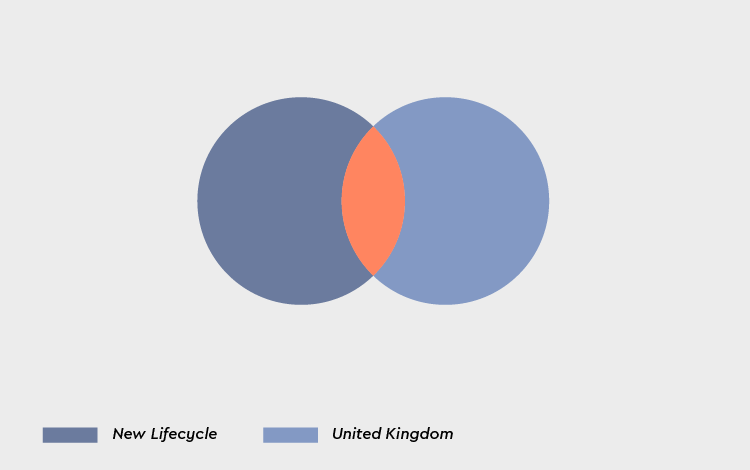
The "AND" criteria
Using "AND" will narrow your search by returning results with ALL of your terms. You are effectively deciding that ALL your criteria must be fulfilled in the target group.
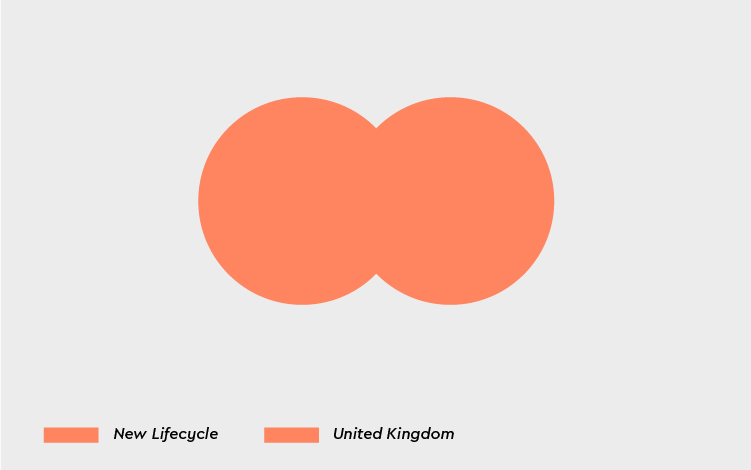
The "OR" criteria
There may be occasions when you need to do the opposite and search in a way that is more inclusive, giving you more options.
Nested criteria
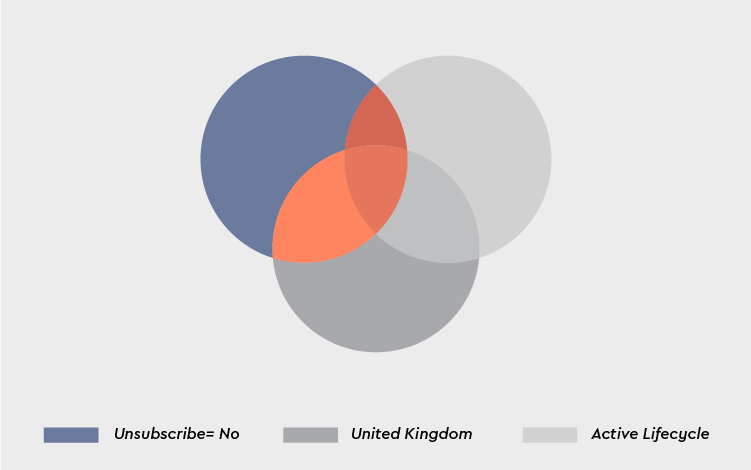
A nested criterion is set within parenthesis. For example, the "AND" criteria between B and C in Criteria A AND (Criteria B AND Criteria C).
Please note:
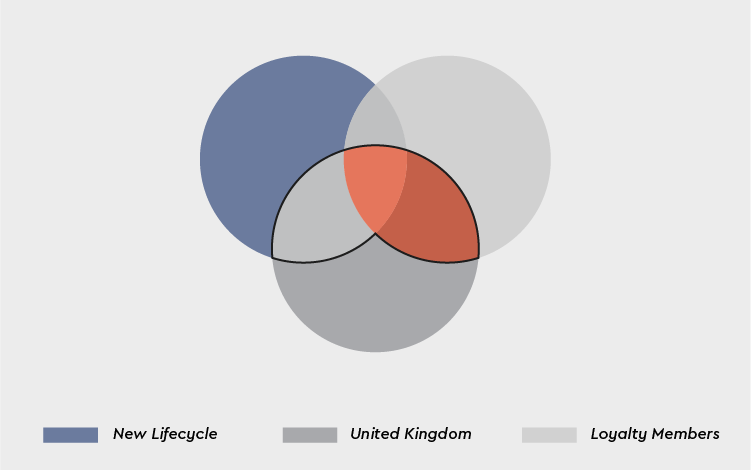
Not using parentheses in the above expression would generate results for:
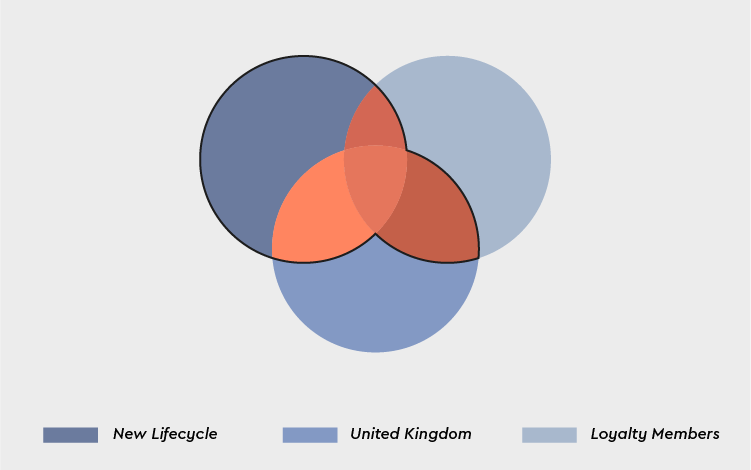
New Lifecycle OR Loyalty Members AND United Kingdom, which is the same as New Lifecycle OR (Loyalty Members AND United Kingdom). As can be seen from the diagram below, this will return results for your New Lifecycle on its own or where it intersects with Loyalty Members or United Kingdom customers (the area framed in black), which is very different from what you intended.