
Promotional campaigns are is most common way incentivise a customer to make a purchase/deposit. If you’ve integrated a promotion or bonus system with Optimove via API, you automatically grant your promotions in your campaigns.
In this article, you will get an overview of they different ways you can activate and allocate promotions in your campaigns.
Selecting Promotions in the Campaign Builder
Once promotions are added to Optimove using the relevant API calls, you can select them when setting up a campaign. This enables Optimove to initiate a process for automatically granting promotions to individual customers in the promotion system.
Leveraging Promotions as Personalization Tags
If you are sending promotional campaigns via one of Optimove's native channels, you can leverage a personalization tag to populate with a promotion code in your email or mobile push notification.
Depending on your promotion type, there are three tags you can use:
1. Generic Promo Code
For generic promotion codes where all customers in the campaign receive the same promotion code, use the general Personalization tag named “promo.”
In this case, use the General tag, as seen in the image below:
2. Personalized Promo Code
For personalized promotion codes, where each customer receives a unique promotion code, use the Customer Data tag named “Promo_code.”
This option allocates promo codes per customer via an attribute, which can be added into your batch files transfer. This attribute can then be updated during the Batch Data Update or via the Update Customer Attributes API call.
If this attribute is unavailable as a Customer Data tag in your Optimove instance, ask your CSM to create the “Promo_code” attribute.
Note: this is only relevant when using Conditional Execution
3. Unique Promo Codes
Another option is to upload Unique Promo Codes as a CSV file and allow Optimove to allocate the codes per customer in your OptiMail campaigns. Read here for a guide on how to implement Unique Promo Codes.
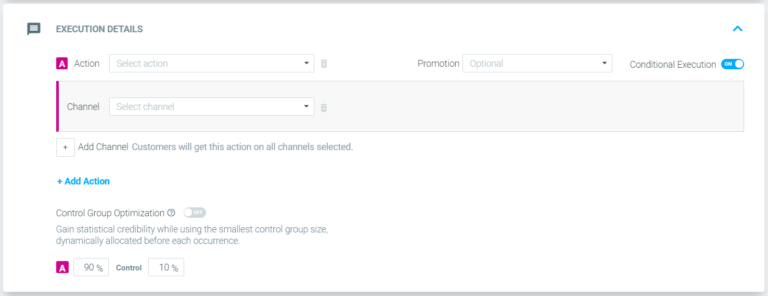
Activating Promo Codes Using Conditional Execution
Perhaps you want to send an email campaign to 1000 customers, offering a particular promotion (e.g., 10% off the entire store). However, you may want to ensure that your campaign is sent only to customers for whom the promotion was already activated in your promo/bonus system.
Optimove’s Conditional Execution allows you to ensure that only customers who are eligible for the specific promotion or bonus receive its campaign.
First, you need to integrate your promotion or bonus system with Optimove via API.
Once your promotion system is integrated, you can set up the campaign in Optimove with Conditional Execution so that Optimove will first activate this promotion for the customers in your promotion system.
Only after the promotion was successfully activated for customers, will those customers receive the email campaign. Optimove will not send the campaign to any customers for whom the promo activation failed (whatever the reason for the failure).
Experimenting with Promo Generosity
Using promotions is the most common way to lure customers in, but sometimes we end up giving consumers greater discounts than necessary - also known as excessive marketing generosity.
Sometimes, a customer will make a purchase/deposit with a lower discount, or even no discount at all. As a result, you generate lower profit margins and missed opportunities.
To determine the right level of generosity, you can use the AI Offer Decisioning Agent (formerly Self-Optimizing Campaigns) to decide the most effective promotion for each customer.
Let's say you're delivering a promotion campaign to maximize the value of customers with a high probability of becoming Top Spenders.
Rather than sending all customers in the Target Group the same promotion, create an A/B/n test offering a 10%, 15%, and 20% discount. As your Self-Optimizing Campaign analyzes customer responses over time, customers will deliver the optimal promotion to each customer, in turn improving your profit margin.