Overview
Facebook Custom Audiences allow Facebook advertisers to upload bespoke customer lists to Facebook and match them with Facebook users. This allows marketers to leverage their existing customer base on Facebook, adding an additional communication channel to the marketing mix.
- Build rich lookalike audiences based on your customer data within Optimove.
- Create multichannel campaigns that combine Facebook and Instagram advertising with other channels.
- Create retention campaigns on Facebook and Instagram to target customers who unsubscribed from or not responding to other channels.
Optimove allows marketers to integrate directly with Facebook’s Custom Audience feature, dynamically managing Facebook Audiences built within Optimove. Upon creating a campaign, Facebook Custom Audiences are updated based on the campaign’s recurrence (for example, if the campaign has a daily recurrence, the audience will be updated every day).
To maximize the match rate between your customer list and Facebook’s own data, Optimove can match customers based on the below criteria (depending on the data you provide to Optimove):
- Facebook ID
- Phone number
- Gender
- Birthday
- First name
- Last name
- First name initial
- State code
- City
- Zip Code
- Country Code
- Mobile advertiser ID
In case you haven’t integrated Optimove with Facebook yet, please contact your CSM or click here for step-by-step integration instructions.
Use Cases for Facebook and Instagram
Using the target groups you create in Optimove, you can utilize these groups as Custom Audiences on both Facebook and Instagram. You do not need to change anything in your set-up, simply select Instagram as one of your platforms during the Ad Campaign Set-Up in your Ads Manager account. The following use cases can be applied to both Facebook Custom Audiences and Instagram Custom Audiences.
Example Use Case 1: Retarget customers who unsubscribed from email communications
At some point, some of your clients choose to opt out of receiving your newsletters and marketing communications. But opting out of emails does not mean that you can’t advertise to them in other channels.
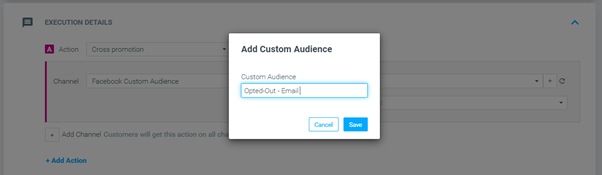
- Build a target group of customers that unsubscribed from email communications.
- Go to the Campaign Builder and create a campaign.
- Select the target group that you have created in step one.
- Set the campaign start date as well as its recurrence pattern. Remember that Optimove will update your custom audience with the customers in the target group based on the campaign’s recurrence.
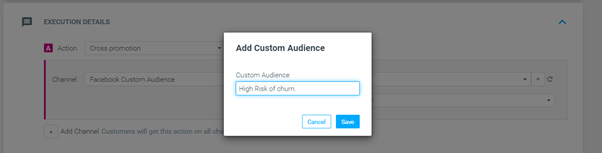
- Under “Channel”, choose “Facebook Custom Audience”. Decide to either create a new custom audience that will be added to Facebook or choose an existing audience from the drop-down menu.
- Schedule the campaign. Once executed, the list of customers will be sent to Facebook and a new audience will be created. The list will be updated based on the campaign’s recurrence.
Go to your Facebook account, and under “Audiences,” you will find the new Custom Audience. Set up your Facebook campaign and choose your new custom audience as the target audience.
The list might take a few minutes to populate on Facebook once the campaign’s status is changed to "running".
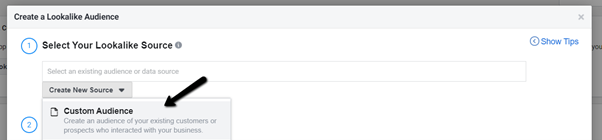
Example Use Case 2: Find your most effective Facebook audience by building a lookalike audience of your highest future value customers
One of the best ways to make use of the Facebook Custom Audiences integration is by building Facebook lookalike audiences that are based on Optimove’s advanced predictive models.
- Build a target group that includes only customers with a high Future Value.
- Go to the Campaign Builder and create a campaign.
- Select the target group that you have created in step one.
- Set the campaign start date as well as its recurrence pattern. Remember that Optimove will update your custom audience with the customers in the target group based on the campaign’s recurrence.
- Under “Channel”, choose “Facebook Custom Audience”. Create a new custom audience that will be added to Facebook or choose an existing audience from the drop-down menu.
- Schedule the campaign. Once executed, the list of customers will be sent to Facebook and a new audience will be created. The list will be updated based on the campaign’s recurrence.
Example Use Case 3: Target customers at risk of churn, who stopped responding to email
Email is one of the most effective communication channels. But at some point or another, many clients stop reacting to emails.
- Build a target group that includes customers with a high risk of churn.
- Go to the Campaign Builder and create a campaign.
- Select the target group that you have created in step one.
- Under “Channel”, choose “Facebook Custom Audience”. Create a new custom audience that will be added to Facebook or choose an existing audience from the drop-down menu.
- Schedule the campaign. Once executed, the list of customers will be sent to Facebook and a new audience will be created. The list will be updated based on the campaign’s recurrence.
- Go to your Facebook account, and under “Audiences,” you will find the new Custom Audience.