
Setting Up the Integration
For your Snapchat integration, we need the following details:
- Client_id
- Client_secret
- Ad_account_id
- redirect_uri
|| Please note: The customer can either create a new app dedicated to Optimove or use an existing app, in which case we will sync all audience names into Optimove unless the user specifies an audience prefix- such as Optimove_[audience name].
Here is the flow on how to get the relevant details out of Snapchat (this flow is for a new App but applies to existing apps as well).
Step One
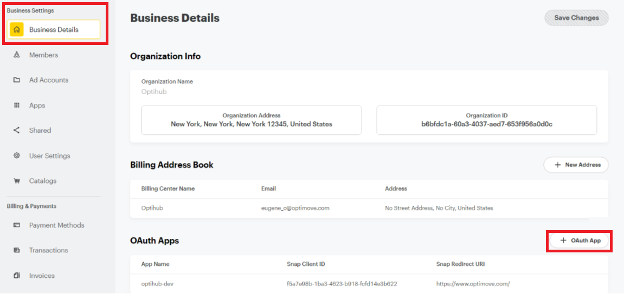
Under the "Business Account" view, you can create a new "OAuth App (click the "+" button).
Step Two
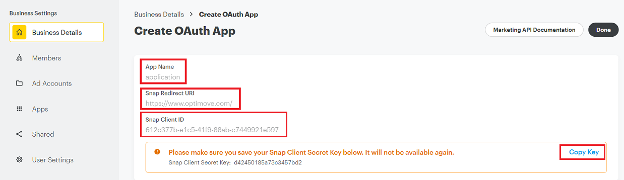
After the "OAuth App" creation, you will get a view with the following message "Here client_id and client_secret(save secret because it is shown only once).
- We need both of the parameters (Client ID and Client Secret)
- Please share the Redirect URL with us
Step Three
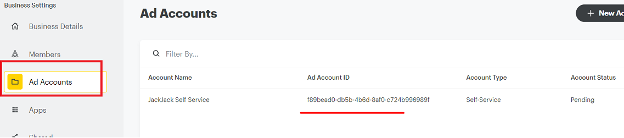
Next, we will need the "ad_account_id" parameter. This can be pulled from the "Ad Account" view.
Step Four
Invite Optimove members with a Business admin role. To do this, carry out the following steps:
- Go to: https://business.snapchat.com/
- Pick Organization
- Navigate to Members
- Invite optihub@optimove.com as a new member
- Make sure it has Business Admin role.
Ensure that Customer Email Addresses are Included in Your Optimove Batch Data Update
If customer email addresses are not already included in the batch data provided by your company to Optimove, they must be added to the process. This is because Snapchat uses email addresses to identify customers.
Executing Snapchat Campaigns Using Optimove
Once the above setup steps have been completed, you can run your first Snapchat retargeting campaign using Optimove, as follows.
1. Schedule a Snapchat Campaign in Optimove
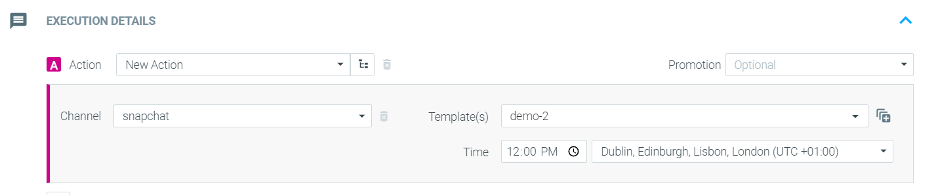
When scheduling a campaign in Optimove, select the Snapchat execution channel and then select the desired Snapchat Audience from the drop-down list that appears.
2. Set Up the Campaign on Snapchat
After the campaign is scheduled within Optimove, use the Snapchat Management Center platform to create the desired campaign for the Audience List populated by Optimove.
3. Optimove Automatically Populates Snapchat Audience Lists
Daily, Optimove automatically populates all selected Audience Lists with the customer email addresses included in each campaign’s selected target group. When the campaign’s measurement period concludes, Optimove automatically removes all email addresses from the Snapchat Audience List.
Please note:
- Optimove will only populate the Audience List with customers that have a valid email address. Thus, a target group may contain 2,000 customers, but only 1700 may be added to the Audience List for that target group’s campaign if the rest do not have valid email addresses in the Optimove database.
- Audiences must be bigger than 1000 customers
- Audiences may take up to 10 hours to sync.
- New audience names will be added to the campaign builder dropdown every 30 minutes