
To ensure your customer segments are up to date before campaign execution, use the Re-Evaluate Target Group capability.
When selected, Optimove will review the data of customers who are in a target group 30 minutes before campaign execution and remove customers who no longer match the group’s criteria. When using the re-evaluation options, campaigns' templates can be updated up to 30 minutes before execution time.
Why should you use Re-evaluate Target Group?
Optimove calculates your target groups as part of your Batch Data Update. As a result, changes in customer data that take place between the Batch Data Update and your campaign execution time, might not be reflected in the final composition of your target group.
What selection criteria can be used to re-evaluate a target group?
In order for Optimove to re-evaluate a target group, and remove customers who no longer fit its criteria, one or more of the following criteria must be included in the target group:
- Customer attributes updated via SDK streamed events
- Engagement History
- Campaign History
- Web and App Activity
- Any attribute using the “today” condition
- Support Data from Zendesk (for those with the integration)
- Customer attributes updated via API
How to set up a campaign using Re-evaluate Target Group
To set up a marketing campaign to use the Re-evaluate Target Group capability follow the below steps:
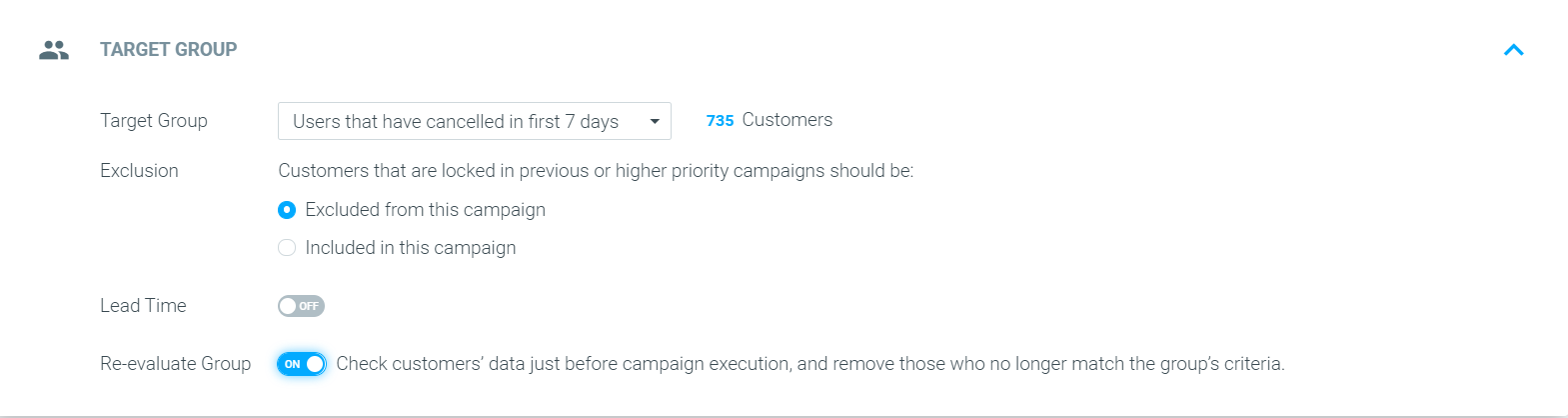
- Create a target group that includes one or more of the criteria mentioned above.
- Go to the Campaign Builder and select the desired target group.
- Define the exclusion settings for this campaign.
- Toggle “on” the “Re-evaluate Group” option.
- Complete your campaign setup.
Please note:
When creating a campaign with Re-evaluate Group enabled, you must execute the campaign at least 45 minutes before the scheduled time, to allow Optimove enough time to receive the relevant API calls for campaign execution. Learn more about how using Force Run affects campaign execution time here.
I do not have the Re-evaluate Group toggle in my Campaign Builder
If you do not see the Re-evaluate Group option in your Campaign Builder, contact your CSM so that it can be enabled for you.