Outbound IP Address Update
Optimove is updating its outbound IP address ranges for Listener events and ETLs on March 15, 2022.
IP allowlists are usually managed by the IT team in your organization. If your organization has configured them, failure to update the IPs might result in connection issues for data transfers and failures in campaign execution.
If you do currently maintain an allowlist of outbound IP address ranges, you will need to add the updated IP ranges to your allowlist before March 15.
If you have any third parties working or operating with Optimove’s APIs on your behalf, please make sure to inform them of the upcoming changes.
If you do not currently maintain an allowlist of outbound IP addresses this change does not affect you there’s nothing you need to do!
|
EMEA Region IPs:
|
APAC Region IPs:
|
|---|---|
|
84.16.241.59 (Existing)
34.159.94.86 (New)
35.242.197.153 (New)
34.159.242.247 (New)
|
141.226.133.59 (Existing)
35.245.236.141 (New)
34.145.132.59 (New)
34.145.232.78 (New)
|
|| Note: Optimove does not know if IP whitelisting/allowlist is configured in your infrastructure.
Daylight Savings 2022
March marks daylight savings around the world, changing the clock moving an hour from standard time.
In order to ensure your batch-data process isn’t impacted by daylight savings, we recommend setting its scheduled time to the UTC zone.
Calculated Customer Attributes
From now on you can combine existing attributes as a mathematical function (e.g., Total Order Amount – Total Discounts Amount = Total Paid) or as a day-based relationship (e.g., Days Between First Deposit, Last Month, and Last Deposit, Last Month = Activity Days, Last Month).
|| Open Beta: this capability is currently in Open Beta and may not be available to all customers. For information beyond this article, please reach out to your Customer Success Manager.
Realtime Campaigns in the Customer 360
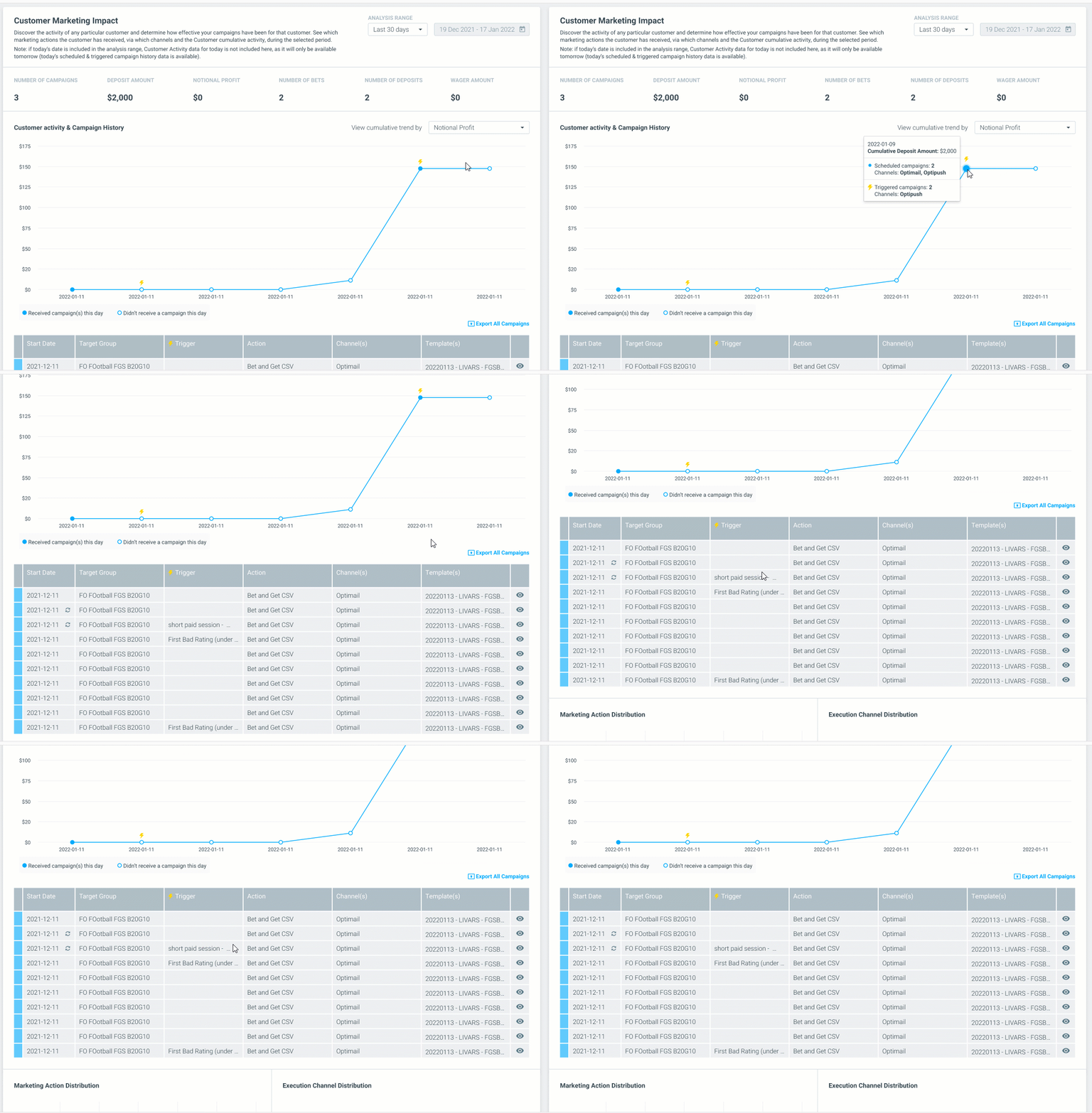
The customer 360 report provides an in-depth look into each individual customer and the history of campaigns sent to them.
In the past, only scheduled campaigns were displayed in the Customer Marketing Impact report.
Now, real-time triggered campaigns have been added to this report, providing a more comprehensive view and deeper insights into the impact of all your marketing campaigns on your business KPIs by presenting all the campaigns executed for an individual customer in the given timeframe.
When a triggered campaign has been executed, you will see the triggered campaign icon (yes, just like in the Mission Control), and will be able to hover over the icon to see the breakdown of the scheduled or triggered campaigns and relevant channels.
Additionally, the "List" view has a new home below the activity chart, instead of on a different page. In the list view, you can see all the customer's campaign history including the target groups, triggers, actions, channels, and templates they received.