
Last updated: July 20, 2021
Coming this fall, September 2021, Apple will release version iOS 15. This update includes privacy-related features that put more control into the hands of Apple users.
For email marketers, this news may have some ramifications and may require a change in how we measure and optimize our campaigns.
The following article answers key questions regarding iOS 15 and its impact on email marketers.
We will continuously update it with new questions as more information becomes available.
General
What will the iOS 15 update include?
iOS 15 will introduce several significant changes. Among the features that will impact email marketers:
- Mail Privacy Protection toggle option - blocks invisible pixels that senders use to collect user information like email opens.
The new feature also masks a user’s IP address, preventing it from being linked to any other online activity or used to determine their location. - ‘Hide My Email,’ Apple’s iCloud Premium feature - allows its users to create, and then burn randomized addresses that forward emails to their iCloud accounts.
How will it work on the recipients' side?
The update prevents senders from knowing when emails are opened on Apple's native mail app. Also, recipients' IP addresses can't be linked to an online activity or used to determine their location.
This is done by automatically loading the content of the email once it is delivered to Apple Mail, which ultimately means that opens and IP address will not be usable. That's because they are no longer tied to the individual. Additionally, timestamps, forwarding, device identifiers, and even live content (such as countdown timers) will become unusable.
Is there content that I can share with my team to prepare?
Sure! You can send them this FAQs article, or alternatively, you can share this blog post or watch this webinar, both written and held by our Director of Email Marketing Dana Shirlen.
Measurement
What is the expected impact on the open rates and on reporting in Optimove?
Apple will render all emails in the app as open, so we might see inflation in open rates.
That's a good opportunity to start measuring incrementality instead of vanity metrics.
Test how the behavior of customers who receive the email differs from the behavior of control group customers. Measure your influence by focusing on how deeper-impact metrics, like uplift, LTV, click-to-convert, and revenue per subscriber, are incrementally better.
What measures should I take now, before the change?
Start testing today when opens are still a reliable metric to use. In addition to that, you should gradually move towards tracking uplift, LTV, click-to-convert, and revenue per subscriber. By doing so, your transition will be flawless.
Use test and control as soon as you can so you can prove performance, and see the real impact by observing a subset of customers who don't receive your campaign.
If someone opens their email through the Gmail app, its safe to say its business as usual?
Yes. The open tracking changes only impact recipients who are opening emails using Apple's native mail app on Apple devices like iPhones, iPads and Mac machines.
So what should I focus on in terms of tracking and measurement?
Well, this is where this update becomes an opportunity, rather than an obstacle.
Now that measuring email opens is no longer possible, marketers will be less inclined to rely on 'vanity metrics' and more interested in actual business impact.
It is important to remember that there's a reason we're doing email marketing, and it isn't "email opens". Our goal is to run campaigns that directly impact ROI and customer lifetime value. It always has been and still is better to measure uplift and real-intent indicators (clicks).
Marketers should shift from weaker data points (like opens) and measure their incremental impact using test and control groups with revenue and LTV goals. This approach is much more useful for driving real business value with email marketing.
Will clicks in emails that are opened with Apple's native mail app still be tracked accurately and visible in Click Maps?
Yes. From what we know right now, there is no impact on clicks or clicks to messages sent when looking at the Click Map in Optimove.
Should we be looking for ways to separate these burner addresses from normal email addresses? (In targeting and/or in tracking & KPIs)
Since we're still not 100% sure as to how these addresses will appear (only that they'll have an iCloud.com domain), we recommend paying close attention to your pre and post-iCloud subscriber counts. Furthermore, look into how they're engaging with your email (beyond the open) and brand overall.
If you see a significant upwards trend in iCloud users during this fall - it's a good indication that many of your users are using Apple's burner addresses.
This may also indicate that you have a lot of users interested in your product, but not your content. In such a case, we recommend investing time into rethinking your segmentation strategy and possibly your content strategy as well.
What would be recommended metrics to report on?
Measure incrementality instead of vanity metrics.
Test the behavior of customers who receive your email vs a control group. Measure your influence by focusing on how deeper metrics, like uplift, LTV, click-to-convert, and revenue per subscriber, are incrementally improving.
What is the benefit of using test/control with the new privacy updates in iOS 15?
Using test/control in your campaigns is always recommended! You can only learn the real impact of your campaign when you use a subset of users who do not receive it at all and compare the results.
Now, more than ever, you should utilize the testing methods Optimove offers to gain impactful insights and improve business KPIs. Email opens were always a vanity metric. Now, Apple made them officially irrelevant.
Orchestration
What type of campaigns/ data should I consider adding to my CRM strategy?
Let our tech identify intent and replace manual journeys with triggered campaigns and AI-mapped journeys.
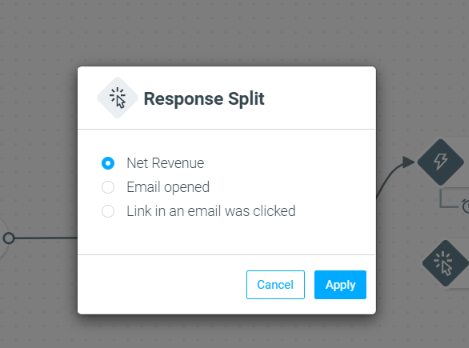
If you absolutely must build your journeys manually, then use Revenue Gained, Link Clicked, or attribute splits instead.
Optimove offers an extensive set of tools to help you react to customers' actions, and optimize for strategic objectives.
Should I edit Streams that utilize 'Split by Response'?
Yes. Fixing broken customer journeys is necessary once Email Open splits become an obsolete metric.
Use ‘revenue gained’ / other KPI or ‘link clicked’ as they are more reliable. Do not split based on opens.
Segmentation
Should I edit target groups that use "opens" as selection criteria?
Yes. Target groups that use attributes such as "Days Since Last Open" should be edited.
Take advantage of Optimove’s robust segmentation capabilities and use real-time attributes, calculated attributes, and our engagement-dedicated selection criteria, such as Activity History, Web & App Activity, Purchase History, and Engagement Activities rather than Opens.
Should I edit my email templates?
You may need to do so.
Creating email templates that contain live information, such as recipient geolocation, may hamper email engagement and effectiveness.
Instead, leverage your data to personalize your content and utilize realtime personalization tags and conditional formatting.
You can also create the perfect message for each customer with all the engagement options that DynamicMail provides, such as Carousels, Scratch & Reveal, Dynamic Content, and more.
Should I reconsider my Lifecycle Stage targeting?
To maintain good engagement results and high reputation rates, we do recommend focusing more on your live customer base (meaning, New, Active, and Reactivated Lifecycle Stages).
DynamicMail
Are there features of DynamicMail that will be impacted?
Many of the functionalities will continue to work as they do today. Including personalized images, segmented images, video, carousel, and pop-ups.
Some components will require some thought and planning around their inclusion in your campaigns. Additionally, since data latencies are happening in other services it will not be so surprising to your subscribers if the data for the weather or the Instagram feed content will not be the freshest.
Components that are using context on the open (such as location, time, device, weather) may be impacted due to Apple masking the IP. You must also keep in mind that while we have been using IP addresses as a proxy for location, this was not always a perfect measure. There is always the option to use first or zero-party data by utilizing customer attributes such as zip code or favorite store as a proxy for location.
Finally, the engagement tracking pixel will not be able to track engagement metrics for subscribers who are opening their emails from Apple Native Mail since the email client will block our ability to track these metrics completely. However, we will still be able to gather this data from other email clients.
How do I continue using DynamicMail effectively?
We believe that personalization will remain a main aspect of your DynamicMail components. Personalization tags are not going away. This means that personalizing emails using DynamicMail’s personalized image, segmented images, and product recommendation components are still all going to work.
You will also be able to use DynamicMail components to add interactions and elements of surprise to your templates through things like pop-ups, reveals, and carousels.
While the aspect of the content updating at the time of the open may be less relevant for users whose content is being cached. You can still consider the values of including blocks in recurring campaigns that will continuously update. For example, including your Instagram feed in the footer of an email or using an image swap component to allow you to create a recurring template that will have a hero image you can preconfigure to change on a weekly basis without opening or touching the email template.